December 7, 2018
Question

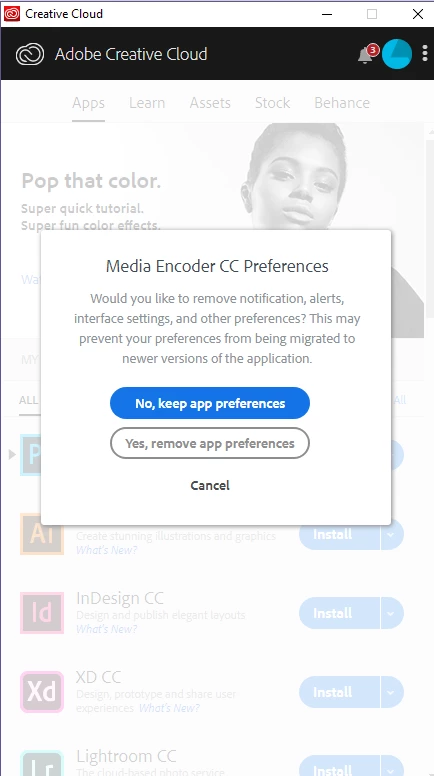
Adobe Creative Cloud keeps asking about Encoder CC preferences

  • December 7, 2018
  • 2 replies
  • 2309 views

CC keeps asking if I would like to remove notifications, alerts, interface settings and other preferences? I have the two options of 'No, keep app preferences' and 'Yes, remove app preferences' Regardless of how I answer it keeps popping up and asking the same question over and over again.

I've tried to quit the program, even ending the task in the task manager.

Any help would be appreciated, thank you.

    This topic has been closed for replies.

    2 replies

    Participant
    May 5, 2019

    I've been having the same issue for the past week and I get this same message every five minutes, regardless if I have any adobe applications or services running on my desktop. Creative Cloud will pop back up out of nowhere and completely stop what I'm doing for a whole ten seconds to ask me whether or not I want to remove my preferences for Premiere or Photoshop. I've tried installing and reinstalling the application, (not just photoshop and premiere, but creative cloud itself), and it still continues to do this.

    kglad
    Community Expert
    Community Expert
    May 5, 2019

    uninstall everything cc including preferences, https://helpx.adobe.com/creative-cloud/help/uninstall-remove-app.html

    then uninstall the cc desktop app, https://helpx.adobe.com/creative-cloud/help/uninstall-creative-cloud-desktop-app.html

    clean your computer of cc files per http://www.adobe.com/support/contact/cscleanertool.html

    restart your computer (don't skip this)

    reinstall the cc desktop app, https://creative.adobe.com/products/creative-cloud.

    if you're unable to install the cc desktop app at this stage, use an administrator account (solution 4 here, https://helpx.adobe.com/creative-cloud/kb/creative-cloud-missing-damaged.html)

    use the desktop app to install your cc programs/trials

    kglad
    Community Expert
    Community Expert
    December 8, 2018

    restart your computer and then try installing (if ame's not already installed).