
johnnyblair
Participant
December 5, 2018
Question

Adobe Media Encoder Caption Issue

  • December 5, 2018
  • 2 replies
  • 3093 views

We used to be able to take a video file along with an .SRT or .SCC file and export them as an mp4 with embedded subtitles.  Somewhere during one of the last few software updates we have lost this ability.  We can bring the video file into AME just fine but when we click the captions tab everything is greyed out.  Did something change with AME?  Is this feature now not available anymore and must we use PP for complete these tasks?
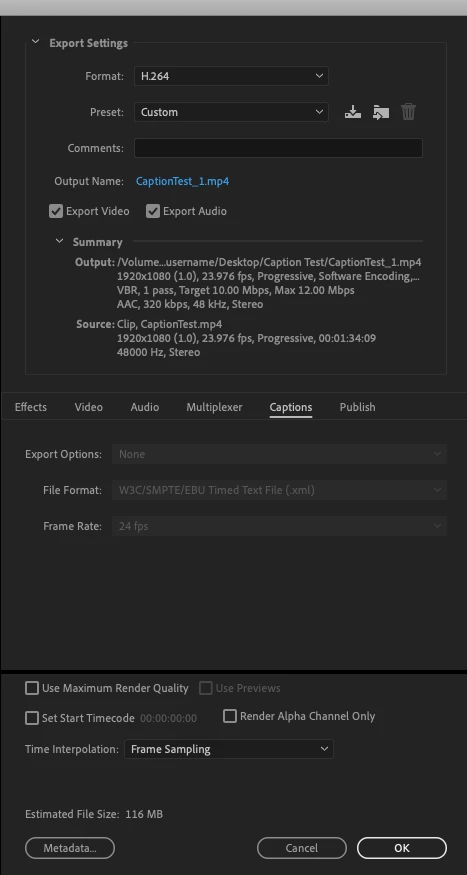
Thanks in advance

Johnny

This topic has been closed for replies.

2 replies

johnnyblair
Participant
December 5, 2018

Ok so in the latest version of PP I have a "Caption Import Settings" button.  When I click it I am then presented with the following settings window.

Choosing "Overwrite file settings" and changing it to CEA-608 allows me to once again embed closed captions into my quicktime file. AME still will not let me embed for some reason but I will worry about that later unless anyone else has any ideas.

Stan Jones
Community Expert
Community Expert
December 5, 2018

Right, the import dialogue!

I have only a second right now.

Mac or PC?

If the problem is that the settings are okay, but AME does not actually imbed, iehter "export" from PR (does that work) or BEFORE the "queue" to AME, change the AME preferences to deselect "Import sequences natively." There has been a bug, but I thought the bug that remains only affects burn ins.

johnnyblair
Participant
December 5, 2018

I just checked with PP and when importing both the movie file and the .srt, I am able to see caption options but only the option to burn in is available to me.

Stan Jones
Community Expert
Community Expert
December 5, 2018

I did not think it was ever possible to embed captions in PR except for quicktime and mxf 0p1. I wonder if you were using a quicktime h.264. Willing to learn!

I just checked in 2018.1.2 and 2015.2, and I don't see the embed option for H.264 format.

Also, to embed you'd need a closed caption stream. When you import srt (at least in newer versions), you get Open Caption.

But even with a closed caption stream, with regular H.264, you only get the option to burn in or create a side car.

johnnyblair
Participant
December 5, 2018

CEA-608 captions can be embedded into a quicktime file from what I recall.