


rowana84771233
Participant
Nov 6, 2018 1:22 AM UTC
Question

Adobe Media Encoder: Grace period has expired; purchase a CC subscription

I have a user that experiences this once a month.  He has an active Creative Cloud, all apps, subscription.  Every month Media Encoder throws this error:
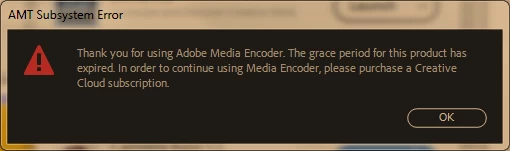
I have tried other suggestions I've found via Google: updating (if necessary) Media Encoder to latest version, signing out and back in to Adobe account but these haven't worked.  The only solution that works is to uninstall and reinstall Media Encoder.  This is an unacceptable disruption and means my user can't use the software we've paid for until I intervene (we have a very locked down environment and software installation by ordinary user is strictly forbidden).

The subscription has never been on a trial basis, license was purchased before the software was installed.  Computer in question is Windows 7 Pro x64.

Any ideas?


This topic is closed to new replies. Start a new post to keep the conversation going.

10 replies

caroline_edits
Community Manager
Community Manager
Nov 28, 2018 11:01 PM UTC

Hey RowanA!

Did either of these ideas work for you?

Let us know!

Caroline

Translate
rowana84771233
Participant
Nov 28, 2018 11:17 PM UTC

Hi Caroline

No neither of these ideas worked for me.  I haven't tried them since they were suggested as the 30 day grace period since hasn't expired, but these are actions I have previously taken without success.

Translate
caroline_edits
Community Manager
Community Manager
Nov 29, 2018 12:04 AM UTC

Have you tried the solutions listed here?

Stop Adobe Creative Cloud from opening in trial mode after purchase

-Caroline

Translate
Peru Bob
Community Expert
Community Expert
Nov 7, 2018 6:46 PM UTC

You may need to reinstall the Adobe Desktop App:

Download Creative Cloud desktop app

Translate
rowana84771233
Participant
Nov 28, 2018 11:15 PM UTC

Thanks Peru Bob.  Indeed, reinstalling the CC Desktop App 'fixes' the problem in the same way that reinstalling AME 'fixes' the problem.  But only for 30 days, so not a fix but a restart of the grace period.

Translate
Adobe Employee
Nov 7, 2018 12:49 AM UTC

Sounds like AME didn't get licensed properly.  It went to 30 days grace launch and expired after 30days.  Could you go to Creative Cloud app and launch AME by clicking "Open" button?  If you don't see the "Open" button, please wait for a moment till Creative Cloud app communicates with the licensing server.  This should license AME.

Translate
rowana84771233
Participant
Nov 28, 2018 11:11 PM UTC

Thanks for the suggestion, but this doesn't fix the problem.  It's by clicking on 'Open' that the message about grace period expiring appears.

Translate