



Adobe Media Encoder stops while encoding - help!
I have tried a dozen different ideas from the forums and can't find a solution.
Windows 10, i7-7600 cpu @ 2.80GHz
8gb ram
AME CC 2017 (version 11.1.2.35 of AME)
Created a video in Premiere and AME just stops and hangs when it reaches a certain part of the video. Premiere won't export it either. I have created dozens of videos so I have no idea what's different this time. The video is about 10 minutes of 4k drone footage with a music back - super simple.
I have reset Premiere (shift-alt on startup) and deleted all the cache files. I rendered the clip where encoder hangs and then added it back, then I deleted the clip entirely, then I deleted the clip and the music track and no matter - it stops in the same place every time (about 14% done with Premiere, and about 14 minutes in on what AME estimates is a 2 hour job).
I read a few places that people had a "bad clip" in their video, and once they removed it it worked - how on earth am I supposed to find the one "bad" clip if premiere previews fine and the clip in question isn't the one AME stops on?
One more thing - when AME stops the last frames it was working on has a weird distorted color look on the output preview window.
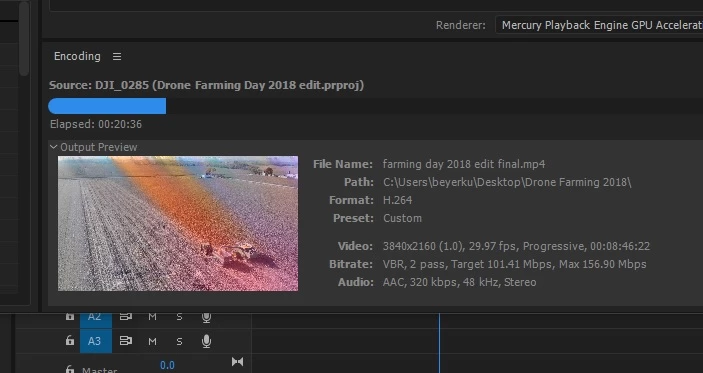
Any other thoughts or help?
 AdChoices