
Adobe Media Encoder unexpectedly rendering very low quality .mp4 files
Hi everyone,
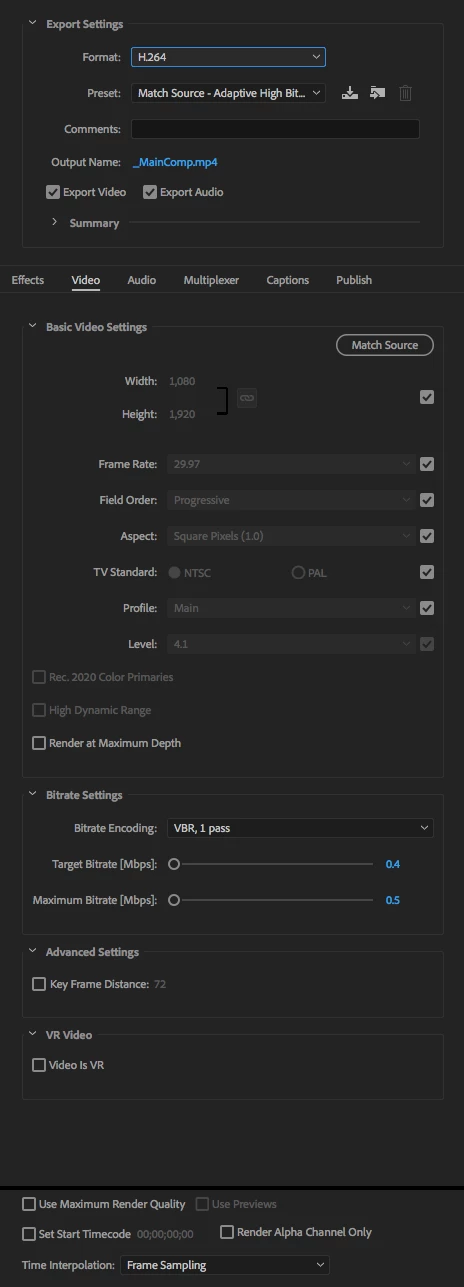
I have been rendering AE animations through Adobe Media Encoder for awhile now, but I'll admit I don't know the technical aspects of the application very well (i.e. effects, presets, bitrate, etc). I never really needed to know since the process was always easy and straightforward, and I never had any issues. I'd add my composition to AME, choose the destination and rename the file, and hit render. I never messed with the format or video settings, and it was alway set to H.264. However, out of nowhere, whenever I render something (I never touched the settings), the .mp4 file looks horrendous. It's glitchy, the aliasing is the worst I've seen in any .mp4 file, and the animation is skippy and irregular, not smooth.
I've attached a screenshot of my render settings. If anyone could tell me how to solve this issue I would really appreciate it. I need to get back to my normal workflow ASAP!
Thanks,
Tom
[Here is the list of all Adobe forums... https://forums.adobe.com/welcome]
[Moved from generic Cloud/Setup forum to the specific Program forum... Mod]


 AdChoices