
Participant
December 28, 2016
Answered

AME 2017 not recognized by Premiere 2015?

  • December 28, 2016
  • 1 reply
  • 507 views

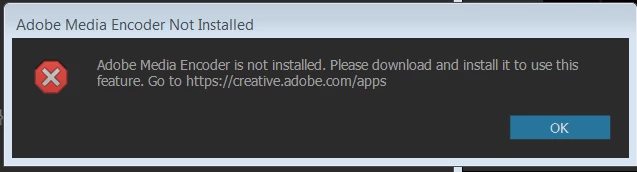
So I downloaded the new AME 2017. Did NOT update Premiere from 2015 since I'm mid-project on something that I don't want to debug. But now when I want to export from Premiere using AME, I get an error message stating that AME is NOT INSTALLED even though I can open AME 2017 on its own. Is Premiere looking in the wrong location or something?
    This topic has been closed for replies.
    Correct answer Vidya Sagar

    Hi Jfschwall,

    Queuing export from Premiere Pro to Adobe Media Encoder work only when the both applications are of the same version.

    Please install previous version of Media Encoder to use the feature.

    Help Article: How to Find and Install Previous Version of Adobe Apps in CC 2015 | Adobe Customer Care Team

    Thanks,

    Vidya Sagar.

    1 reply

    Vidya Sagar
    Adobe Employee
    Vidya SagarCorrect answer
    Adobe Employee
    December 29, 2016

    Hi Jfschwall,

    Queuing export from Premiere Pro to Adobe Media Encoder work only when the both applications are of the same version.

    Please install previous version of Media Encoder to use the feature.

    Help Article: How to Find and Install Previous Version of Adobe Apps in CC 2015 | Adobe Customer Care Team

    Thanks,

    Vidya Sagar.

    jfschwallAuthor
    Participant
    December 29, 2016

    Thank you for responding.

    I wanted to go back to the previous version, but AME 2015 is not listed under the 'older versions' section of Creative Cloud. How else can I re-download the 2015 version?

    jfschwallAuthor
    Participant
    December 29, 2016

    Scratch that. I just clicked through your link.

    Thanks again!