alexdejesus
Inspiring
June 25, 2014
Answered

AME CC2014 Very Slow Encoding

  • June 25, 2014
  • 20 replies
  • 32042 views

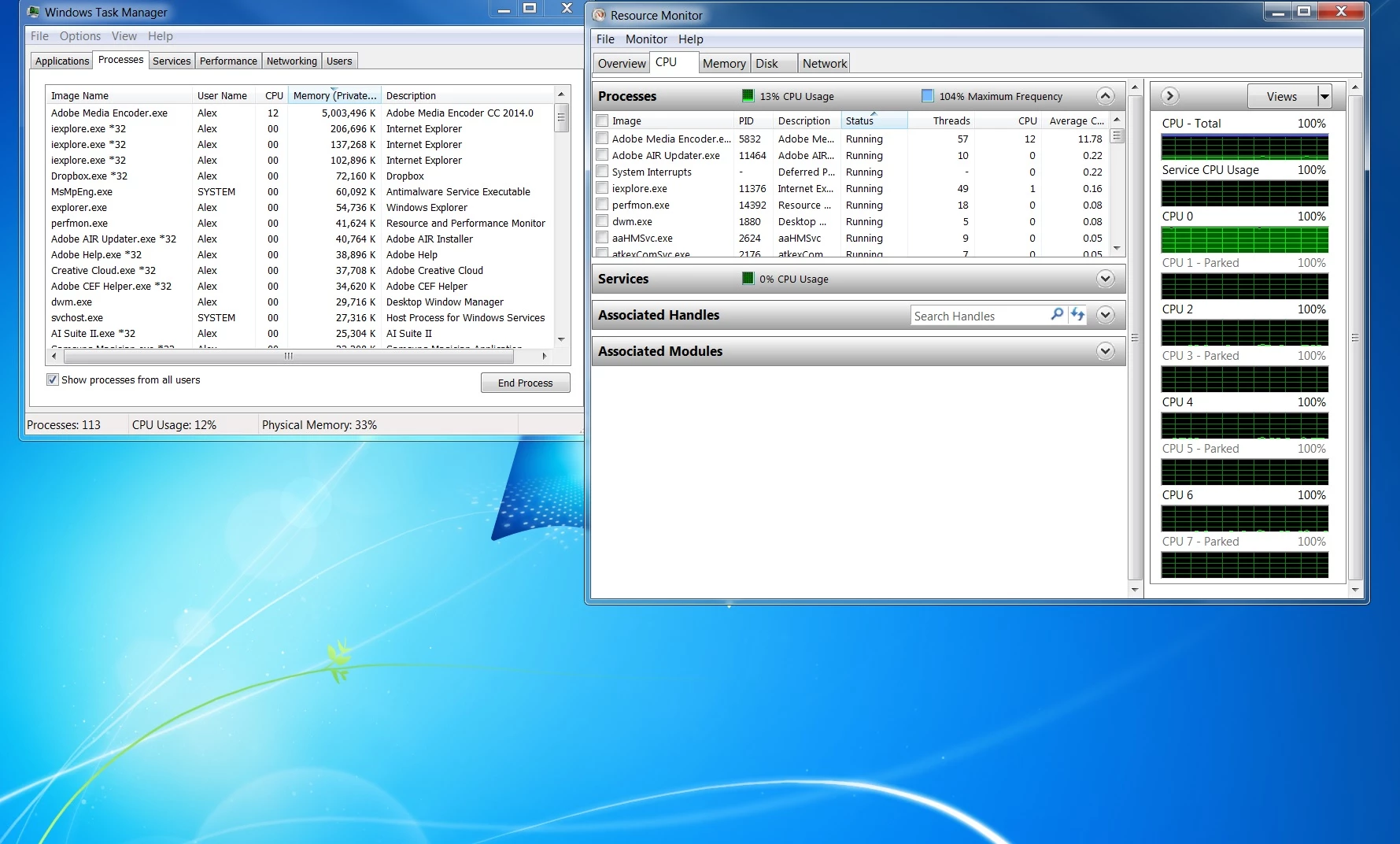
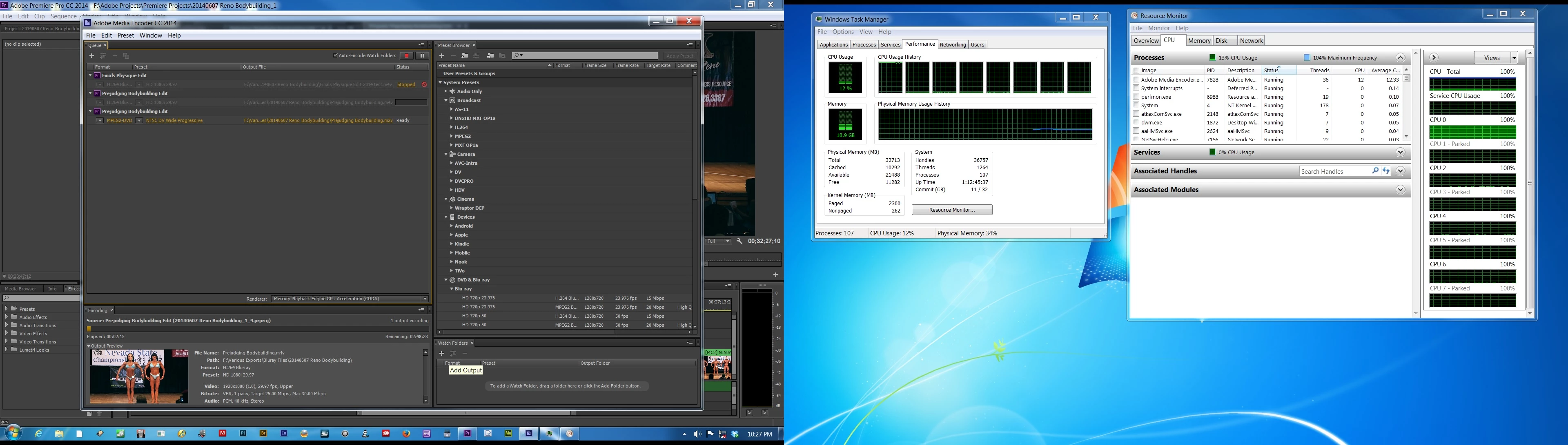
Encoding is very slow with AME CC 2014. Resource monitor shows only one of the eight CPUs working while the rest are parked. This was not happening in CC version. Is there anything I can do to control this? I happen to be exporting to h264 Bluray. Says it has 2 1/2 hours remaining, which is way tool long for this project.

This topic has been closed for replies.
Correct answer MMeguro

Software-Only rendering made it much slower. Disabling 'Import Sequences Natively' did not make a difference


Thank you for trying Alex.

I stumble upon this article regarding the CPU parking performance issue.

http://ultimatecomputers.net/forum/viewtopic.php?f=7&t=3644

This article also tells how to fix the CPU park issue.  I wonder if this can solve your issue.  It may be worth trying.  This involves the registry change.  So, please make the change very carefully if you have decided to follow the fix instruction.

20 replies

Participating Frequently
August 29, 2016

I just stumbled upon this after racking my brain about why proxies were taking so long to create.  The link to the registry edit fix is no longer available.  After reading through other forums, I read that Adobe removed multi-processing for everything and was going to make it better with a different design, so I just assumed this was an issue that was still in work, which is why I haven't questioned why I was only getting a single cpu's worth of work in AME over the last year.  I never really bothered to look into it as I did an AVI work around.

My workflow is copy the media (4K H.264 mov files) from SD card to a drive, open AE and import the media, create proxies for the 2 clips, and queue them in AME.  Only 1 processor gets used, takes 10-12 hours to render low quality/low res proxies, tried DNx, H264, JPEG 2000, Image-JPG and several others.  Then I got the bright idea after reading here to remove Adobe link from the picture and just added the video files directly to AME.  Render time went down to 20 minutes (roughly 1.5 hours of video) for a DNxHR output.  23 of 24 cores were being utilized.

In the interim, I have been creating AVI proxies, rendering directly from AE as it was fast, and exporting the final production out in AVI directly from After Effects (which for 1.5 hr video takes a lot of space at 4K and again it wasn't really utilizing many processors, but way faster than going through AME), then I pull those files into AME manually and compress.  I think you guys need to take another look at this issue.  Dynamic link is kind of useless for a lot of us being this slow.  Something with dynamic link is slowing everything down if it can't create a simple proxy.

My system specs:  Dual Xeon 2687w v4 12 core CPUs (48 threads), 64 GB DDR4, 470 GB M.2 Program drive, RAID 1 950 Pro 1TB (compressed to here), 6 TB spindle (raw source read from here), and SLI dual GTX 1080i (I tried software render and GPU, no difference).  I had this PC built for several tasks, not just video editing, hence the multi-processor, but it should be able to handle this out of the box a lot better I think.

Vollwertkost
Participant
June 9, 2016

Just changed from After Effects CS6 to CC, yesterday. Following this, I can't render as H.264 in AE anymore, but instead queue the encoding to AME. My problem is the same as everybody else is describing. Horrid encoding times in AME, compared to the near realtime encoding in AE just yesterday. The drop in performance is staggering! I'm in the middle of a project and this delay is, needless to say, extremely detrimental. That's what you get for updating...

To top things off, the proposed fix (http://ultimatecomputers.net/forum/viewtopic.php?f=7&t=3644 ) is offline. Can anyone write the necessary steps down in this thread? Much obliged!

KaneLauck
Participant
April 27, 2016

I am having this issue as well and its extremely frustrating. I have a Windows 10 box, Xeon E3-1230 v3 3.3ghz quad core CPU, 16 gigs of 2400mhz RAM, AMD Radeon R9 290, and an SSD.

No matter what I do, export from PPro, queue in Media Encoder, different export settings, ALWAYS it only uses around 20 to 30% of my CPU power. I've tried the CPU parking hack, but supposedly Windows 10 doesn't have that. I've tried turning off "Import sequences natively", no difference. I've tried software rendering only, no difference.

WHY is this happening! It makes these products essentially useless! Please help!

rainabba
Participant
May 24, 2015

Also suddenly seeing only single-core use. Running Windows 8.1 Pro, couldn't find the registry entry, but if I shut down Premier and AME, then start just AME, AME uses all cores and rendering time is at LEAST 400% faster. (quad-core with HT enabled system).

Clearly, something is going on with Premier that prevents AME from using all cores.

Participant
March 4, 2015

So I tried following the support line troubleshooting directions and this is my result. Simplified and disabled some programs on the startup as one option. Disk clean up as another and unistalled/reinstalled Adobe Media Encoder. Next, I went to File -> Add After Effects Composition and set my render preferences. Which is not what I've normally done in the past. I would normally due a "add to render queue" or "or send to ame". And I'm getting the same result. Slow rendering speed. A 45 second comp took over 20 minutes. Is there anyway I can reinstall AME CC or CS6 version??? This is not good for me or my company time management. Please update this fix or help with reinstalling previous version of Media Encoder.

Participant
March 12, 2015

Guys... I have disabled Core Parking and I am NONE of the Adobe CC2014 Apps will use more than a single CPU in my Dual Xeon System.  They will max out the 36 logical cores on the first CPU and leave the second one untouched...  I purchased BECAUSE of the information Adobe Publishes on its site, white paper and instructional videos.  I switched to Window just for to use Adobe from Mac and Final Cut.... What a waste of my time and money.  My old system 12 core 2010 Mac Pro Tower running FCPX was faster and NEVER crashed.... Premiere will sometimes just shut down.

Cinebench maxes out all 72 Logical Cores but Adobe can only see a single Processor.  I don't think the new version was compiled to run on Mult-CPU machines....

Participating Frequently
April 30, 2015

Drevil02,

I am having the same problem with a twin xeon 36 core machine. It is not your build, Adobe, just does not address the logical cores. They tried to blame my mother board, they said that it was not report all the cores... Windows see's all 72 logical core, so its an ADOBE ISSUE!

Participant
March 3, 2015

Here's a 45 second clip which is taking 30 minutes to render to H.264 at 1080P/29.97 FPS. The screen shot shows fluxuation on the cpu as well, dropping in percentage.

Kevin-Monahan
Community Manager
Community Manager
March 3, 2015

Hi JAO Pictures,

At this point, please work the video queue on our support line here: https://helpx.adobe.com/contact.html?step=PPRO_how-tos-troubleshooting_troubleshoot

Sorry for the inconvenience.

Thanks,

Kevin

Kevin Monahan - Sr. Community and Engagement Strategist – Adobe Pro Video and Audio
Participant
March 3, 2015

I just spoke with Scott from Adobe Customer Care. Was told to report the same issue, which everyone in this thread seems to have. Since upgrading from CS6 to current CC, the encoding/rendering time has went from 2 minute proj files with 2-5minute rendering times to 2 minute proj files with 20 to 30 minute rendering times. I have to explain my lack in workflow to my bosses which is never a good thing especially when putting it on the company card. I did the troubleshooting steps as mentioned above with the same outcome. I hope the images provided give insight to the issue we're all having.

Participant
March 3, 2015

Here's another example. If you compare the 3 screen shots, AfterFX.exe seems to be hogging all the CPU power in these.

Participating Frequently
February 16, 2015

So I'm a little lost too. Just a few days ago I heard about the multiple cores switch in registry. I enabled it and it was rendering much faster now. However, last night I updated Encoder, Premiere, and AE and now when I render something it is again just using one core. However the registry is still set to use all of them. Is there something in the software that I can set? Something that an update could have done? Please advise!

Windows 7 SP1, 32 GB Ram, i7-4910MQ, GeForce 870M

Participating Frequently
February 17, 2015

I think I might have found the answer to my problem.

I found a setting in After Effects that allows you to "render multiple frames simultaneously". I checked it (activated it) but it didn't really make any difference. I have 8 cores; "Actual CPUs that will be used: 3". My RAM allocation per background CPU was set to 4 GB. 4x8=32 GB of Ram. My total RAM is 32 GB and I've reserved 6 GB to use for other applications. (All these settings are under Preferences>Memory & Multiprocessing in After Effects)

I set my reserved RAM to 5GB.

I changed my "RAM allocation per background CPU" to 3GB.

Now my "Actual CPUs that will be used:" is 7.

I was running different scenarios and checks and so it is not impossible that I might have made another change somewhere that I'm not aware of that could possibly affect this too. But I doubt it.

Extra (possibly unrelated) info: Before AME was really really slow, and then about 2 hours into a render, it would go unresponsive. I tried multiple times and it hung every time - always when doing an AE comp render in that PPro sequence.

I tried using AME to render only the AE comp alone, and I never let it run long enough to hang, but I would let it run up to 45 minutes on a 20 second (full HD) comp! Crazy slow!

So I went directly into AE and added to render queue and did a render from there - and that took me all of about 6 minutes to render that 20 seconds!

I then put that rendered file (Uncompressed) into my PPro sequence instead of that AE Comp and did another export {including the AE change to render multiple frames simultaneously AND unchecked - in AME - "Import sequences natively"} and then AME flew through that render (1080p, 25-30Mbps, 29.97fps, double pass) in about 30 minutes!

Right now I'm pretty happy with that! Still curious whether my AME will hang again on the AE Comp directly but I do have an option and render it out from AE directly. I would like to know why it is like that if anyone knows. But maybe now it's all tuned correctly to not have that problem again... Good night!    

anttattoo674
Participant
February 16, 2015
Known Participant
December 23, 2014

I've also been experiencing significantly slower render times (about 3 times longer) ever since editing with CC.  Premiere 5.5 was really fast in comparison.  I'm now currently on the latest version CC 2014.  I get the same render times from the timeline or from AME.  My CPU usage is hovering around 50%  I have a i7 980x and a GTX460 24GB of ram.

I've tried both disabling "import sequences natively" as well as altered the registry to no benefit.  I edit weddings so this has really been effecting my output!   

westley
Participating Frequently
December 23, 2014

I certainly found the "import sequences natively" option when enabled slowed down the render.

All seems to be working well for me with the registry hack applied from above and disabling "import sequences natively". I'm running with very simillar hardware to you and on Windows 7 64 bit SP1.

Participating Frequently
February 14, 2015

Only slow enconding in H.264 format - all other codecs are working fast and without problems :-(

AME CC 2014.2 Build: 8.2.0.54 / CPU parking disabled as per the post above with the registry edit.

"Remaining encoding time 45h" that's not funny...

--> Encoding with the H.264 Format results in max CPU usage of 35-40%

--> Encoding with the H.264 Bluray Format results in max CPU usage of 95%

--> No difference if I dissable CUDA rendering or render directly from PP

--> Every time a encoding in H.264 format starts the CPU is peaking 85% for half a second and then falls behind to the usual 35% (I see that no RAM cache is used with H.264 but with H.264 Bluray it is...)

no problems with other codecs or applications - the machine is working fine...

I urgendtly need my fast H.264 encoding back but have no idea how to get it working again...

config: Asus X99-E WS mainboard with 8core Intel i7 5960x and 64GB DDR-4 Ram + some video raidd's and temp SSD drives