
Participant
June 3, 2021
Question

Audio Only MFX output

  • June 3, 2021
  • 2 replies
  • 370 views

Hi - 

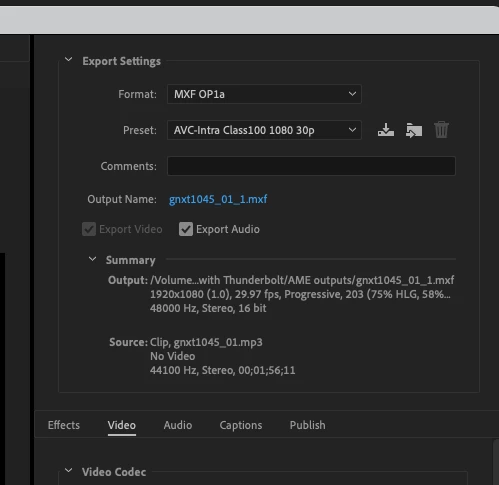
I need to deliver music with metadata to video editors working in Media Composer. They've requested MFX files, which I can create in Adobe Media Encoder, but the file sizes jump into the gigabytes because I can't deselect the video export button (greyed out) . Any tips on how to do this efficiently (on a daily basis!)


Thanks!
This topic has been closed for replies.

2 replies

Warren Heaton10841144
Community Expert
Community Expert
June 3, 2021

Ask the editor if you can provide a format found in the Audio Only presets.

For Avid, you'd want to be in the DNxHD MXF OP1a presets or the DNxHR MXF OP1a presets, but as far as I am aware none of those allow us to disable "Export Video".  If I remember correctly, all of the Avid CODECs have the video settings locked to the DNx CODEC.  So, 1080p footage needs to be using one of the DNx 1080p COCECs and not one of the DNx 720p ones.


You'll even notice in your screenshot that only "Export Audio" can be disabled.


Irl16B8Author
Participant
June 3, 2021

Yes, thanks, I got that far. But that explodes a 100MB audio file to 1000MB.  😞

Warren Heaton10841144
Community Expert
Community Expert
June 4, 2021

I'll try to say this a different way:

Video is being exported with your audio.  "Export Video" is dimmed.  It is not disabled.


Irl16B8Author
Participant
June 3, 2021

Typo - MXF files