


Inspiring
March 8, 2024
Answered

Can I preview in Media Encoder??

  • March 8, 2024
  • 2 replies
  • 1178 views

I'm pretty sure that you used to be able to preview your content in Media Encoder but I can't seem to be able to do that now.
So I can select a range to be exported but I can't actually watch what my selection is!

Is that really the case? How am I supposed to select the bit I want to export based on the audio?
Or simply know exactly what I'm exporting?


Why isn't there a play button in the export settings window???????
This topic has been closed for replies.
Correct answer David Arbor

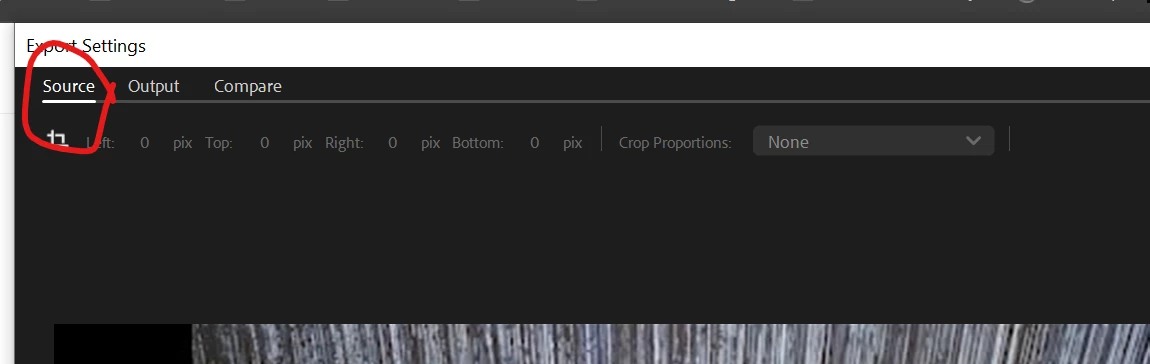
The play button is in the Source tab of the Export Settings window. You're probably looking at the Output tab. To switch tabs, go to the top-left of the window.


2 replies

ChWard
Community Manager
Community Manager
March 13, 2024

In our latest update AME 24.2.1 you are now able to play back video and audio in the source tab. You can also set in and out points, select the whole sequence, review your batch item, etc. 

Furthermore, in public beta we have now introduced a third tab, combining the source and output tab. It is called compare view and lets you easily check the output frame compared to the source. Hope that helps!


Chris

David ArborCorrect answer
Inspiring
March 12, 2024

The play button is in the Source tab of the Export Settings window. You're probably looking at the Output tab. To switch tabs, go to the top-left of the window.