
Can't upsample video from 44.1 to 48 kHz
Hi!
First of all let me stat that I'm not a audio guy (nor a video guy, for that matter), so I might mess up with the concepts a little bit, but I'm trying my best.
Here's the thing: I believe I have some MOV files recorded with 44.1 kHz sample rate. I think so because when I drop them in my sequence in Premiere their audio sound really low pitched.
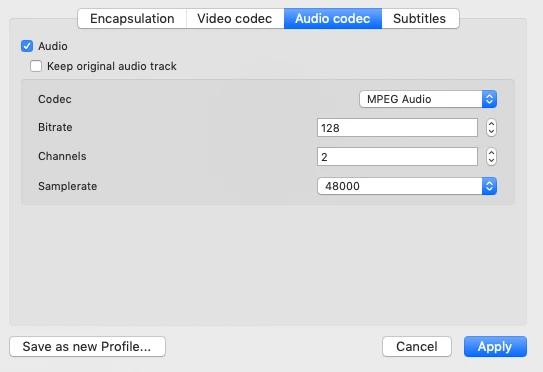
If I try to cover them through VLC player changing the audio sample to 48 kHz, the converted file sounds just fin in Premiere.
The thing is that I have many files to convert and the current version of VLC doesn't allow batch conversion, so I wanted to do this process in AME.
The thing is that if I try to repete the process in AME (with similar settings to the ones that got me where I needed in VLC), nothing happens with the audio. I tried everything that made sense to me and premiere keeps playing the files converted through AME with the wrong pitch (and this covered through VLC with the right pitch).
Any help is appreciated.
Thanks
PS: These are the audio settings that enabled the successful conversion through VLC.


 AdChoices