


bayb95968894
Participant
February 6, 2024
Question

Changing Video Format

  • February 6, 2024
  • 1 reply
  • 854 views

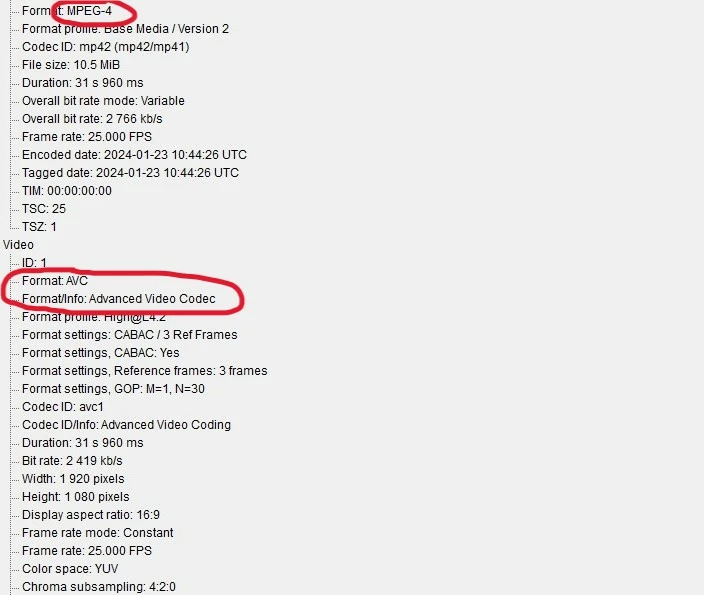
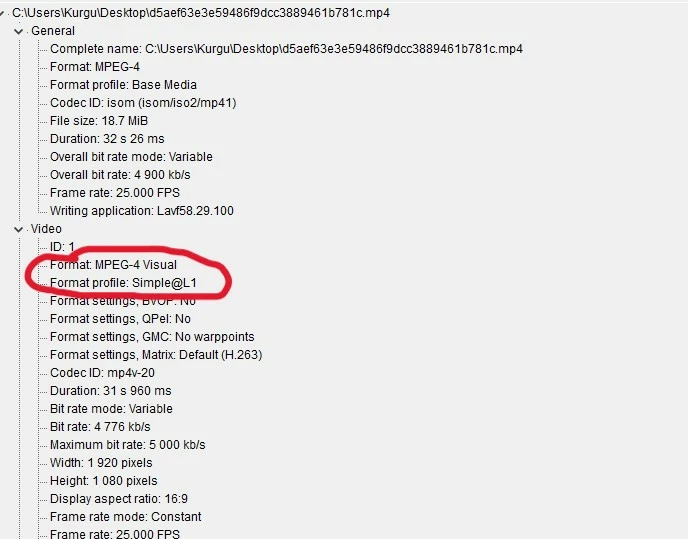
Hello, i have a video with these specs (first picture) but i can't change avc format to mpg4. I tried changing the format from h264 to MPG4 but my video quality drops a lot and aspect ratio changes completely. How can i export or convert video like second picture?
 

This topic has been closed for replies.

1 reply

Inspiring
February 6, 2024

Why do you think you need to change the format? Did you encode both of these files, and if so, how did you do this? Also, how are you changing the format and what is it exactly that you need? THe second file shots H.263, which is a very old compression format. AVC is H.264, which is a modern format, and what most videos online are encoded as. This format is often inside of the mp4 container, so please provide more information so we can help you figure out exactly what you want to do.

bayb95968894
Participant
February 7, 2024

Hi David, i we make videos for company and publish those videos on digital signage tv's. I've been doing this for a while and always use same format which is h264. Howevet they just renew TV's. Some of them do not support the video features in the first photo. They send me second photo i shared and it's the only way we can publish videos. So i need to  convert but i couldn't figure out how can i convert like mpeg 4 visual. I tried to do it in Media Encoder but I couldn't find how to change avc.

Inspiring
February 7, 2024

Thank you for the clarification. According to the second image you posted, you want H.263 and not H.264.  You can get this codec by choosing "MPEG-4" in the "Formats" dropdown menu instead of "H.264." By default, I believe this will give you a .3gp file, but go into the Export Settings > Video tab and see what the options are. I'm unable to get to a computer to look now, but I believe this might be what you're looking for, based on the image you were sent.