


Participant
Oct 23, 2013 7:59 PM UTC
Answered

Converting MOV to MP4

Hi forum,

I'm using AME CS6 and would like to convert a MOV file to MP4. My format options are F4V, FLV, H.264, H.264 (legacy), and MP3. I tried to export using H.264 and ended up with a 3GP file. Is it possible to export a MP4 file using one of my 5 format options? Or are there additional steps that I'll need to take? If so, what are they?

Thanks for your help!
ivansullCorrect answer
Participating Frequently
Nov 5, 2013 8:58 PM UTC

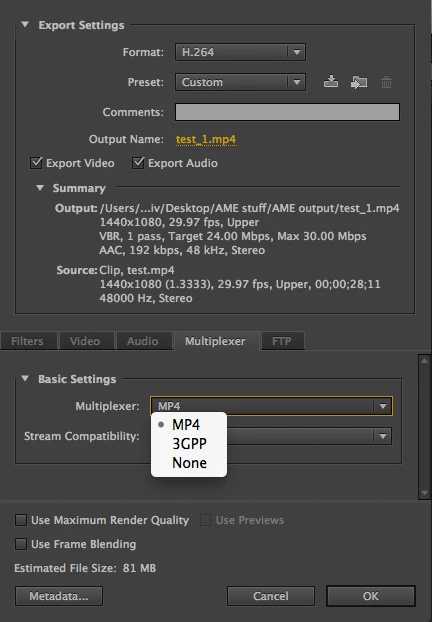
In  H.264 export settings go to the Multiplexer tab and switch from 3GPP to MP4.  Your output file extention should change from .3gp to .mp4

16 replies

Participating Frequently
Apr 13, 2021 11:41 AM UTC

I'm an editor receiving different types of video files like mix of .mov and mp4, etc.

Is there a way to convert them all into 1 same formats before I combine and edit them into 1 sequence?

I've noticed that premiere is having difficulty playing back and exporting the videos probably bc they all have a different formats/codecs while my sequence is set into 1 specific settings for the whole clip.

Translate
Participant
Nov 10, 2019 3:30 PM UTC

hi i did what is shown in the picture but the video is black only with sound when i import the video on the premire pro its just a audio thats why when i do what u said its just a black screen video what should i do?


Translate
Participant
Aug 13, 2018 9:57 AM UTC

you can click https://soundcloudmp3.online to convert annything you want

Translate
Participant
Aug 10, 2018 6:33 AM UTC

i think maybe use a video converter to convert your files is an easier method.

Free HD Video Converter Factory and Handbrake are 2 software i love most. these 2 can help you easily convert MOV to MP4. i personally think HD Video Converter Factory is easier to operate even for novice like me.  Anyway, i think this maybe the easiest way to convert MOV to MP4.

I hope my advice can help you.

Translate
ccrampton
Participating Frequently
Jun 11, 2018 2:28 AM UTC

hi. I still cannot find that function. When I choose MPEG4, it wants to resize the video for some reason. It makes them smaller and I don't know how to change this. This time I am including a screenshot for you.

thanks

Translate
Participating Frequently
Jun 12, 2018 6:17 PM UTC

Do NOT choose MPEG-4, that creates cell phone video (3GP). Start with H.264 format, then choose a preset from dozens offered.

If your cell phone video is Variable Frame Rate, may need to first manually convert to Constant Frame Rate using Handbrake (set to 29.97fps usually). I believe you DO have Variable Frame Rate source now that I look, the source says 22.918, typically odd kind of number one gets with VFR.

Thanks

Jeff

Translate
ccrampton
Participating Frequently
Jun 12, 2018 7:46 PM UTC

thank you so much. I was doing it wrong.

I thought H264 was the crime so I didn't pick that, I guess it's the combination with a .mov that's bad?

Yes I guess it's naughty to use iPhone video but I'm going to keep using it!

Adobe should make Adobe Media Encoder be able to deal with this instead of having to use Handbrake.

Translate
Jun 6, 2017 10:37 AM UTC

If you want to convert MOV to MP3, iDealshare VideoGo can help you with all of them.

Translate
ccrampton
Participating Frequently
Jun 6, 2018 6:45 PM UTC

I was doing a light edit on an AE piece from February, and I could not get my mov files (some from iPhone) to convert correctly to MP4 through a render, the media encoder (would not match source) or Quicktime. I had to go to Handbreak.
Am I missing something?

Adobe stopped supporting H264.mov but did not put a way to convert them in Media Encoder?

Translate
Vinay Dwivedi
Adobe Employee
Adobe Employee
Jun 6, 2018 6:52 PM UTC

Hi Carolyn,

Media Encoder should convert you MOV (Quicktime) file to MP4 (H.264). Do not use match source option as sometime the compression of one file is not supported in another format for you it may be a variable bitrate MOV, H.264 codec file which is not converting to the same while using Match Source. So, choose the settings manually that matches your clip from Video tab or choose any Preset that matches the settings.

//Vinay

Translate
Dec 10, 2015 2:55 AM UTC

Method 1 use online converter like zamzar, onlince convert, cloud convert

This method does not need to install any app. but is it not convinent.

Method 2 use Handbrake or freemaker video converter which is a software for free

This method is free, but not easy to use

Method 3 use a paid software like iDealshare VideoGo to convert MOV to MP4

This method needs to pay, but easy to use and professional and convert without quality loss and has advanced editing feature

Translate
Participant
Feb 22, 2020 7:27 AM UTC

Handbrake was pretty easy!  Saved the day for me.  Great idea!

Translate
ivansullCorrect answer
Participating Frequently
Nov 5, 2013 8:58 PM UTC

In  H.264 export settings go to the Multiplexer tab and switch from 3GPP to MP4.  Your output file extention should change from .3gp to .mp4

Translate
Legend
Oct 23, 2013 11:29 PM UTC

H.264 should generate an MP4 file, assuming you have either Premiere Pro or After Effects installed.

Translate