Mischmastermike
Participant
January 26, 2017
Answered

DNxHD Preset Window Error on Mac and PC

  • January 26, 2017
  • 2 replies
  • 1251 views

Hi,

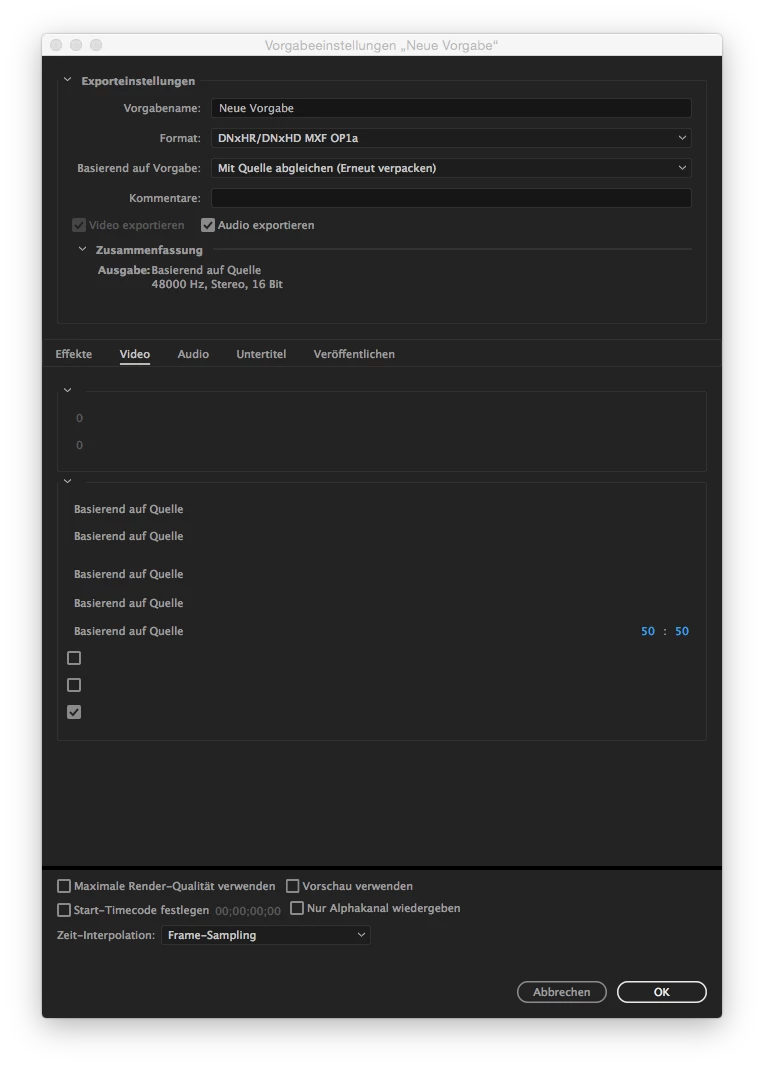
if I want to create a new preset with DNxHD codec and with "based on source (repack)" option the video section looks like this (in german language... lastest version):

Normally (e.g. h264) it should look like this:

So at the moment it's unusable!

Any ideas?

This topic has been closed for replies.
Correct answer pshankar

It seems to be a bug in the latest version. We have created an internal bug to track this issue. Thanks for reporting the issue and sorry for the inconvenience.

To clarify on match source rewrap for DNx vs match source for H.264; when rewrap preset in DNx is selected, video frames from the source are copied to the output (called smart render) without decode and then re-encode of the video frames, so this option results in faster render times preserving the source. The match source preset for H.264 tries to match the output setting with that of the source setting, but it will result in re-encode (decode & encode) because we don't support smart render for H.264 output. This also means with match source for H.264 you can individually match source basic video settings while you can't do that with rewrap preset.


2 replies

pshankarCorrect answer
Adobe Employee
January 30, 2017

It seems to be a bug in the latest version. We have created an internal bug to track this issue. Thanks for reporting the issue and sorry for the inconvenience.

To clarify on match source rewrap for DNx vs match source for H.264; when rewrap preset in DNx is selected, video frames from the source are copied to the output (called smart render) without decode and then re-encode of the video frames, so this option results in faster render times preserving the source. The match source preset for H.264 tries to match the output setting with that of the source setting, but it will result in re-encode (decode & encode) because we don't support smart render for H.264 output. This also means with match source for H.264 you can individually match source basic video settings while you can't do that with rewrap preset.
michaelh83314833
Participating Frequently
January 30, 2017

Hi,

thanks for your response and that you can confirm the bug.

I don't need this function every day, but it made me mad that nobody out there found this bug except me.

I'm looking foreward to the fix.

Regards,

Michael

R Neil Haugen
Legend
January 28, 2017

The options are different, but I've used mine, which looks like yours ... so I'm wondering what you mean by "unusable"?

Neil

Everyone's mileage always varies ...
michaelh83314833
Participating Frequently
January 28, 2017

Ah so it's the same in the english version?

Well, there are no checkboxes on the right side.

All values like hight, width, framerate and so on are missing.

And then there are 3 checkboxes below that with no value text. I can uncheck them and nothing happen or I dont know what happens, because the whole window content is messed up.

The same with the Audio section. Nearly all the information is missing:

michaelh83314833
Participating Frequently
January 28, 2017

Can you post a screenshot of your window. I'm not sure, if we are talking about the same thing.

Maybe I should reinstall it in english to see, if it's just a error in the german version.