
Participant
April 13, 2016
Answered

Dolby Codec not installed

  • April 13, 2016
  • 1 reply
  • 18529 views

My mac lab runs Adobe CC.  Recently I ran RemoteUpdateManager through ARD to update CC on these macs.  Now users are getting the warning:
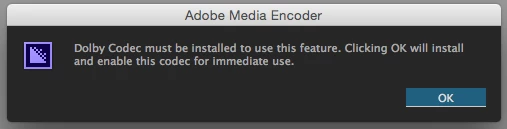
User profiles are wiped upon logout, so this error pops up any time a subsequent user edits AVCHD footage or exports audio as Dolby Digital.   Is there a dolby digital codec I can download/install?  Or, am I stuck having to create a new user template for each workstation...   

This topic has been closed for replies.
Correct answer MMeguro

When Dolby file is imported or exported first time, AME installs the codec into /Users/Shared/AdobeinstalledCodecs/1.0 folder in order to use the codec in the app.  If you delete this folder and codec files in it, you would see this dialog next time you import or export Dolby files again.

1 reply

MMeguroCorrect answer
Adobe Employee
April 18, 2016

When Dolby file is imported or exported first time, AME installs the codec into /Users/Shared/AdobeinstalledCodecs/1.0 folder in order to use the codec in the app.  If you delete this folder and codec files in it, you would see this dialog next time you import or export Dolby files again.

Participant
April 18, 2016

I see the codec files located in the /Users/Shared/ directory.  Our lab is set up to wipe the User folder upon logout, so these files get erased each time.  Is there a permanent location these files can be stored?  Why did the latest update create this issue?  I had a user today importing AVCHD files who had to click through 4 warning boxes for each individual clip! 

Participant
April 18, 2016

Amended the log-out script to not erase .../Shared/AdobeintsalledCodecs/...  Thank you, MMeguro.