

Encoder still does not EMBED CAPTION FILES
I KNOW this is an ongoing PROBLEM!!! Not an issue but a REAL PROBLEM! I've read scores of these threads on CC in PP. MPG2 lists the option but when you apply it to anything in the Queue, it vanishes. What's the deal Adobe?
Working on an iMac with High Sierra 10.13.6
Memory: 32 GB 1333 MHz DDR3
Graphics: AMD Radeon HD 6970M 2048 MB
Blackmagic Design: Intensity Extreme
Premiere Pro: 14.0.0 Build 572. (2020)
Encoder: 14.0 Build 556
The CC file is set for 708 Service 1.
The time line is: LA_GENERIC_TV30B_HD_CC, 1920 x 1080, 00;00;30;00, 29.97 fps 48000 Hz - Stereo
The CEA-708 Service 1 properties: File Path: Captions Type: Captions Image Size: 640 x 480 Frame Rate: 29.97 Total Duration: 00;00;02;29 Pixel Aspect Ratio: 0.9091 Alpha: Straight Alpha
Embed in output file is NOT an option in PP Export window. I send it to Encoder.
The CC files and the timeline again, both set to 708 / Service 1.
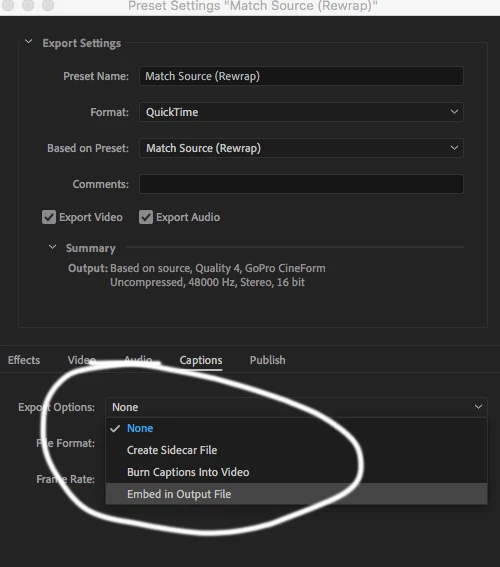
1) In Encoder, I use the QT preset and select the CAPTIONS tab and set it for EMBED IN OUTPUT FILE (screenshot included).
2) I drag the preset to the file to be encoded.
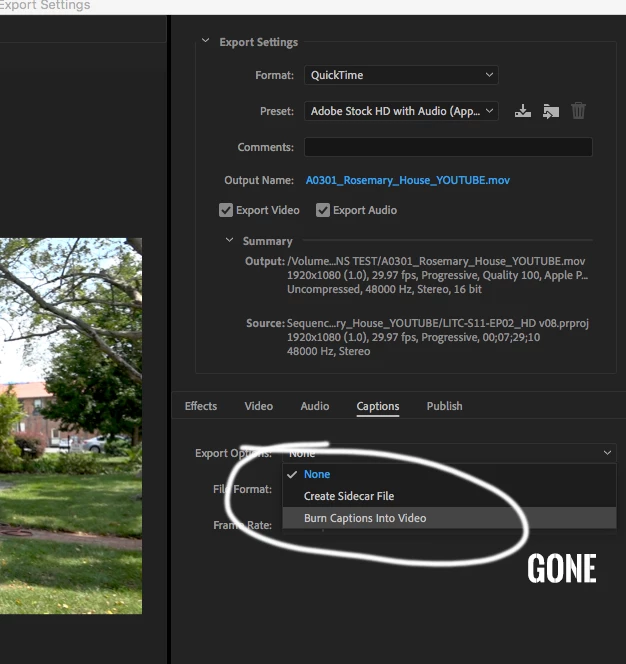
3) I double check the PRESET and the EMBED IN OUTPUT FILE option is gone. (attached)
It does not matter which codec I select in the QuickTime options. It's all the same. Happens on everyone of them. The MXF option is the only that seems to work.
Adobe, you need to remove the options from your Captioning tutorials. It doesn't work.
Why is this?


 AdChoices