

Participant
Feb 23, 2017 4:27 PM UTC
Question

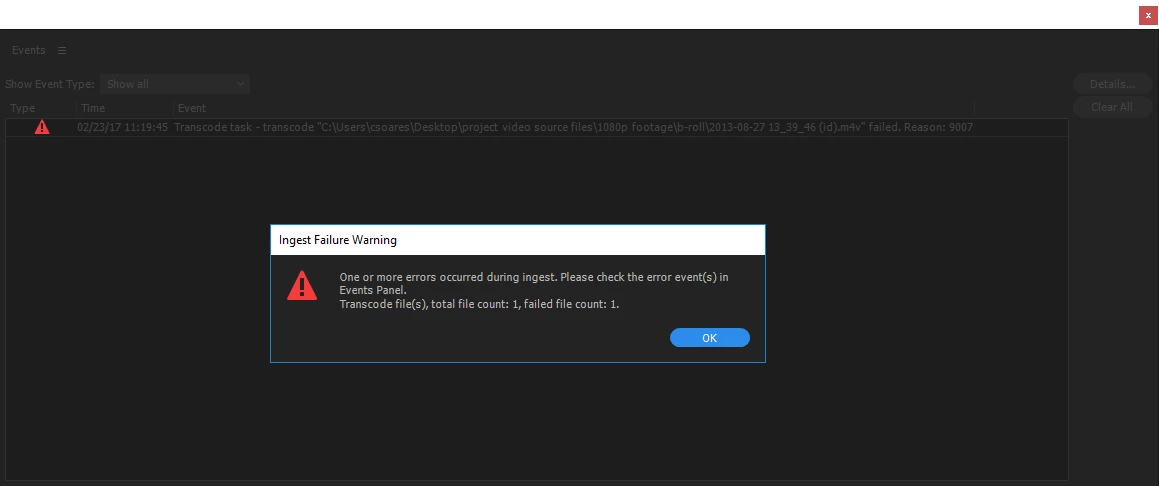
Error transcoding reason 9007

I keep getting this message I am using a windows computer and trying to ingest videos as QuickTime. This is what I get every time. Any ideas

    This topic is closed to new replies. Start a new post to keep the conversation going.

    8 replies

    Participating Frequently
    Jul 8, 2018 10:29 PM UTC

    I am having the exact same issue with .MP4 files from my A7sii.  I sucks that no one is answering this thread.

    Translate
    Vidya Sagar
    Participating Frequently
    Jul 12, 2018 5:07 AM UTC

    Hi InterrobangMP,

    Sorry for the trouble. Are you able to import the files normally into Premiere Pro? Please check.

    What is the version of Media Encoder & Premiere Pro? FAQ: How to find the exact version of Premiere Pro you're using?

    Thanks,

    Vidya

    Translate
    EENewton
    Participant
    Mar 29, 2018 9:27 PM UTC

    Bump, same issue here.

    Translate
    Participating Frequently
    Mar 19, 2018 6:41 PM UTC

    I am having the same problem using the dnxhd mxf o1a format with the match source (rewrap) preset.... It fails every time doing this in prelude. When I've chosen other dnx presets they transcode fine. However, I've also tried using the dnx match source option to transcode and import in premiere... and that has not had any issues.

    Translate
    Inspiring
    Mar 2, 2017 7:07 PM UTC

    Did you use the "Match Source (Rewrap)" preset?

    I just ran into this ingesting footage in Prelude CC2017 (Windows 10). I trimmed some clips in the Ingest window and set them to "Transfer Clips to Destination" and "Transcode." For "Format" I selected "DNxHR/DNxHD MXF OP1a" and the "Preset" was "Match Source (Rewrap)."

    All the rewraps failed. I opened Media Encoder and all the failed transcodes were still in the Queue marked "Failed". I clicked the "Failed" link in one of them and it opened the log in Notepad. The last section said:

    - Source File: Q:\[source path]\DSCF2582.m4v

    - Output File: Q:\[destination path]\DSCF2582.mxf

    - Preset Used: Match Source (Rewrap)

    - Video:

    - Audio:

    - Bitrate:

    - Encoding Time: 00:00:00

    03/02/2017 10:27:48 AM : Encoding Failed

    ------------------------------------------------------------

    The source file's video stream is not compatible with this preset. Please choose a different preset.

    ------------------------------------------------------------

    So I reset the status of one of the failed transcodes to "Ready", then clicked its "Preset" link to bring up the Export Settings window.

    Everything looked fine. I did not make any changes, just clicked OK. As a result, the preset in the Media Encoder Queue for that item had changed to "DNX HQ 1080p 24" (which is the underlying preset Media Encoder selected as matching the source). (If you make changes in the Export Settings, the Preset would change to "Custom".)

    I clicked Start and it transcoded just fine. There was nothing wrong with the values in the preset, something about the very "Match Source (Rewrap)" preset that was problematic.

    I reset that Queue entry's status to "Ready", clicked into the Export Settings again and saved the settings as a named preset so I could find it more easily. Then I then selected the rest of the Failed Queue items, reset status to "Ready" and selected my new preset. All the transcodes ran with no problems.

    My hypothesis is that using a normal named Preset loads settings directly from a file, but "Match Source (Rewrap)" has to run a function to determine which Preset to use, and for some reason the pipe is choking on that extra layer of abstraction.

    HTH

    -Mike

    Translate
    Vidya Sagar
    Participating Frequently
    Mar 2, 2017 3:18 AM UTC

    Hi crystalsBBA,

    Please explain the workflow you are following to the Ingest.

    1. What is the selected preset in the Ingest function? Are you using any custom preset?

    2. Is it working with any other default presets?

    3. Is it working with any other format footage?

    4. Have you tried to transcode the same video file directly to Quicktime in Media Encoder?

    Thanks,

    Vidya

    Translate
    Participating Frequently
    Mar 20, 2018 3:45 PM UTC

    I'm getting the same issue trying to use match source with the dnx format.... but everything appears to work fine when I have a preset other than match source selected.

    Translate
    Participating Frequently
    Mar 21, 2018 4:30 PM UTC

    Bump

    Translate