Inspiring
May 13, 2017
Question

How do I get Adobe Media Encoder to work?
  • May 13, 2017
  • 5 replies
  • 1090 views

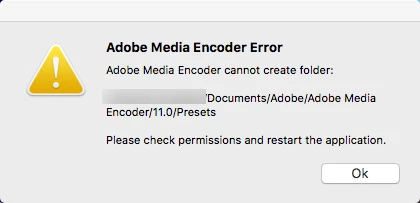
I have Adobe Media Encoder CC 2017 on my Mac. I cannot get it to work.

Above is a screenshot of the error.

I would appreciate information on how to correct this issue.

Thank you.

This topic has been closed for replies.

5 replies

AnotherMeAuthor
Inspiring
May 16, 2017

Thank you Adobe for helping me fix this problem.

AnotherMeAuthor
Inspiring
May 14, 2017

Nariman Sodeifi
Participating Frequently
May 15, 2017

You should contact Adobe Technical Support for such issues. 

I'm not sure why this is happening, but i suspect Support should be able to help you with this.

if I had to recommend a workaround, I would you say you may want to create a new user account on that system and see if that user account has this issue as well or if this is limited to your account.  Possibly a permission issue on your user account.

AnotherMeAuthor
Inspiring
May 16, 2017

Can you give me the best way of contacting Adobe for this problem?

AnotherMeAuthor
Inspiring
May 14, 2017

Bump... Adobe I really need to get this resolved...

AnotherMeAuthor
Inspiring
May 14, 2017

I really hope someone from Adobe can help me with this issue!

AnotherMeAuthor
Inspiring
May 13, 2017

I do have an older version of Adobe Media Encoder on my Mac. Is the solution to this problem to delete them both and do a reinstall of Adobe Media Encoder CC 2017? If so, how do I do a full uninstall of Adobe Media Encoder CS6? I see an uninstall for the cc 2017 version but not the CS6 version.