


Participant
Apr 2, 2020 9:55 PM UTC
Answered

How to export and keep size on ZOOM recordings

Hi!

I have a recording from ZOOM platform. It's 1:30 hour long, with a size of 95mb.

Here's the video details:
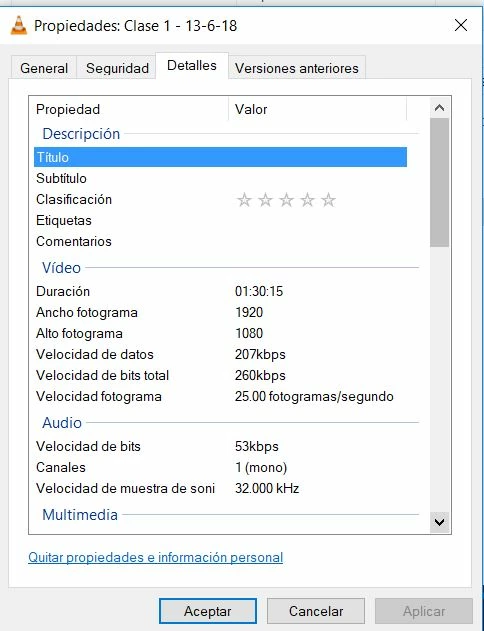
 

I added a watermark on After Effects, and now I wanted to export the file, keeping the same size and quality.

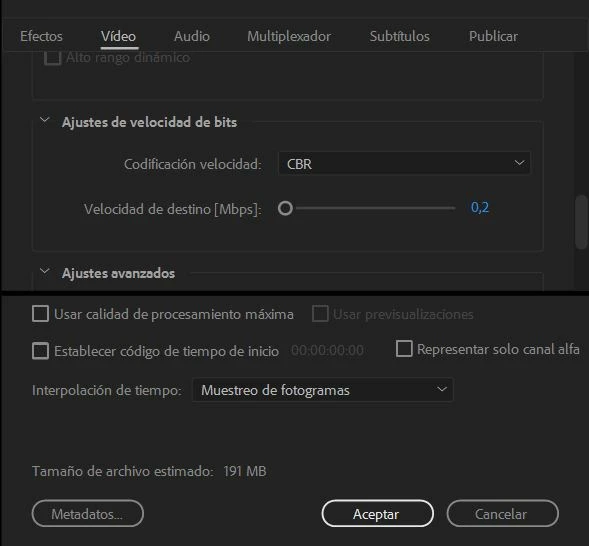
Here's the Media Encoder settings. Notice the estimated output file size.
 

After encoding, file size is 2GB, with these details:
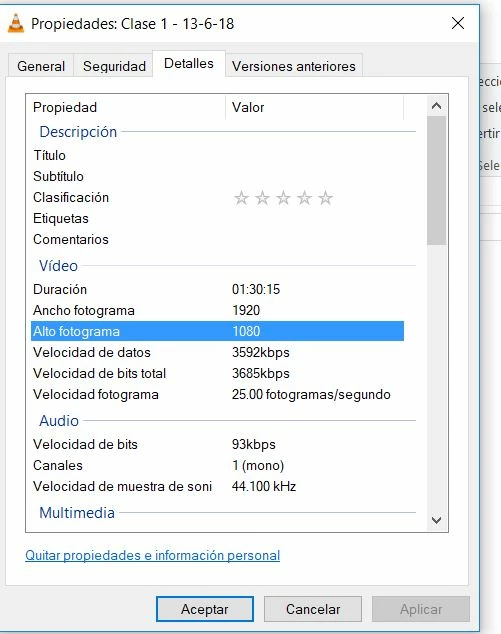


Any clues? The output file didn't respect the size, nor the bit rate.

Thanks,

This topic is closed to new replies. Start a new post to keep the conversation going.
Stan Jones
Stan JonesCorrect answer
Community Expert
Apr 3, 2020 1:41 PM UTC

Try setting to software only mode. I see one report that quicksync does not handle low bitrates.


https://community.adobe.com/t5/media-encoder/exported-video-has-10x-higher-bitrate-than-selected-vbr-1-pass/m-p/9927292?page=1#M6100


Stan

4 replies

Stan Jones
Community Expert
Community Expert
Apr 3, 2020 5:00 PM UTC

Wow! I'm glad I recalled that thread.


Stan

Translate
Stan Jones
Community Expert
Stan JonesCommunity ExpertCorrect answer
Community Expert
Apr 3, 2020 1:41 PM UTC

Try setting to software only mode. I see one report that quicksync does not handle low bitrates.


https://community.adobe.com/t5/media-encoder/exported-video-has-10x-higher-bitrate-than-selected-vbr-1-pass/m-p/9927292?page=1#M6100


Stan

Translate
Jeff Bugbee
Community Expert
Community Expert
Apr 3, 2020 2:45 PM UTC

Good catch, I would not have guessed that.

Translate