ti.s.cavalcanti
Inspiring
January 22, 2015
解決済み

How to render Alpha + RGB in Adobe Media Encoder?

  • January 22, 2015
  • 返信数 3.
  • 297861 ビュー

I want to render a video.

Alpha;

RGB;

Alpha + RGB;

I can do in After Effects:
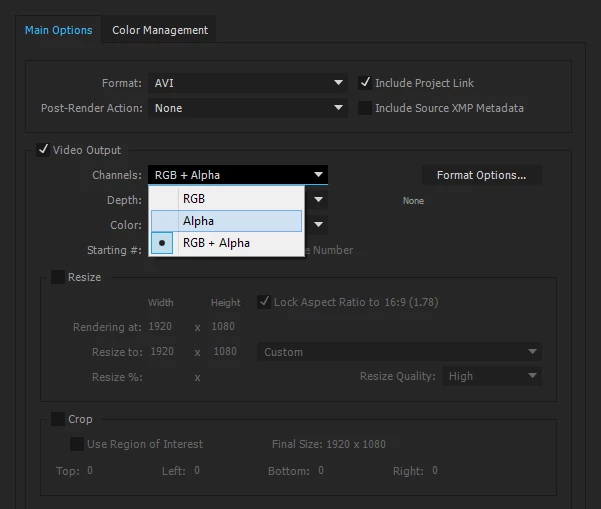
How to do this in Adobe Media Encoder?

このトピックへの返信は締め切られました。
解決に役立った回答 Kevin-Monahan

Hi Ti.S. Cavalcanti,

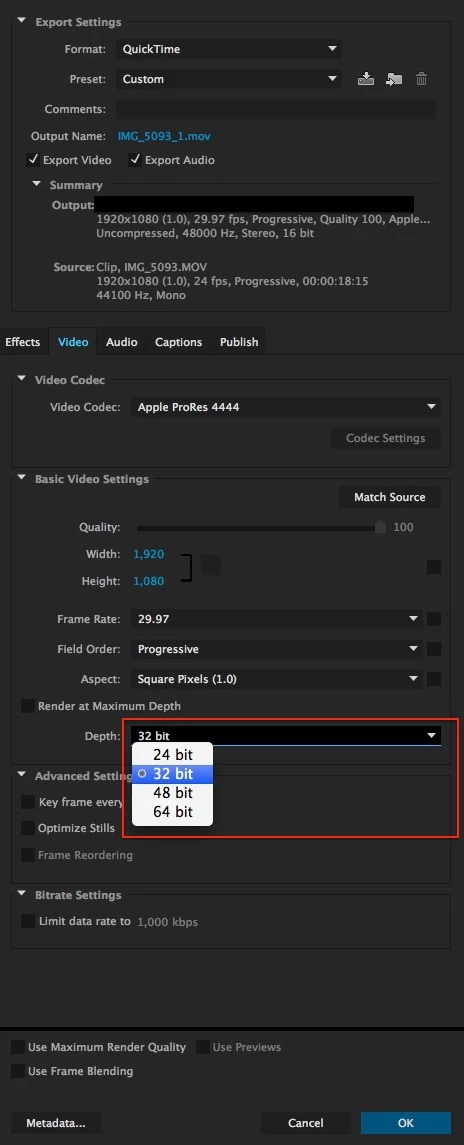
You have to make sure to set the bit depth to 32 bits. Note that only specific codecs allow you to do this.

Thanks,

Kevin

返信数 3

Inspiring
October 26, 2020

None of the cedec presets in Media Encoder seem to offer 32 bits as an option. Does Media encoder do transparency?

Known Participant
July 17, 2016

Well, I've found a different solution. In Media Encoder, I changed the format to quicktime, then in video codec, to PNG. Done. My videos with transparency in avi were almost 2gb. Now have only 20mb, and with the same quality

ti.s.cavalcanti
Inspiring
August 5, 2016

Very good, thanks!

Kevin-Monahan
Community Manager
Kevin-MonahanCommunity Manager解決!
Community Manager
January 22, 2015

Hi Ti.S. Cavalcanti,

You have to make sure to set the bit depth to 32 bits. Note that only specific codecs allow you to do this.

Thanks,

Kevin

Kevin Monahan - Sr. Community & Engagement Strategist – Pro Video and Audio
ti.s.cavalcanti
Inspiring
January 22, 2015

What happens if you put more bits? 48 or 64 for example.

What if I want to render only alpha, how do?

Kevin-Monahan
Community Manager
Community Manager
January 23, 2015

Hi ti.s.cavalcanti,

ti.s.cavalcanti wrote:

What happens if you put more bits? 48 or 64 for example.

What if I want to render only alpha, how do?

Good questions. Let me look into that for you.

Thanks,

Kevin

Kevin Monahan - Sr. Community & Engagement Strategist – Pro Video and Audio