


Increase Maximum Files to Stitch Together
I'm currently working on stitching together a bunch of MOD/AVCHD files from cameras and encoding them into a single video. They don't require editing, this is just videos that need to be connected together, so Adobe Media Encoder's stitching function is the better tool in this case over Adobe Premiere Pro.
However, while some sets I'm having no problem with, others have a larger number of individual clips, and I'm running into the message "Too many source files to display":
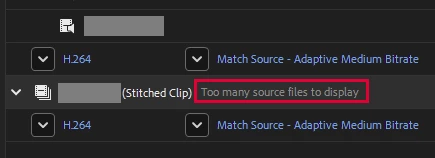
If I was dropping all of the files from a single location into Adobe Media Encoder to be stitched/encoded, this wouldn't be an issue. But many of the files are from other memory cards, and due to the way the camera names the files, you end up with multiple duplicate file names, which Windows Explorer can't handle in a single folder (obviously), but Adobe Media Encoder can have multiple files with the same name in a single stitch set no problem (since the source path is different).
In the screenshot above, you can see I've dragged and dropped my second set of files, and then, I need to expand the sources (by clicking "Show <#> sources") and drag them up into the top set (where everything will be stitched together). But because Adobe Media Encoder shows Too many source files to display, this is impossible.
My workaround solution is that I currently need to write a script in PowerShell to rename all of the files in the other folder and append "_Set2", and then I can put them into the same Windows folder, and then I can drag them all in as one set, and then pray they're listed in the right order since I can't expand the source list to check.
I'm using Adobe Media Encoder 2023 (hardware won't support newer). Is this fixed in newer versions so I can expand the source list with a larger number of files? If not, can this please be added as a feature? It seems silly to limit this.
 AdChoices