


Participant
November 9, 2021
Answered

Media Encoder 2022 is completely broken

  • November 9, 2021
  • 10 replies
  • 3611 views

I'm using a 16-inch 2019 Macbook Pro on its highest specs, running on Catalina and I have just updated AE and ME to the 2022 version. However, ever since I updated, Media Encoder just does NOT want to work. I have a project due TODAY and every time I try to render it gets stuck on "Connecting to Project":
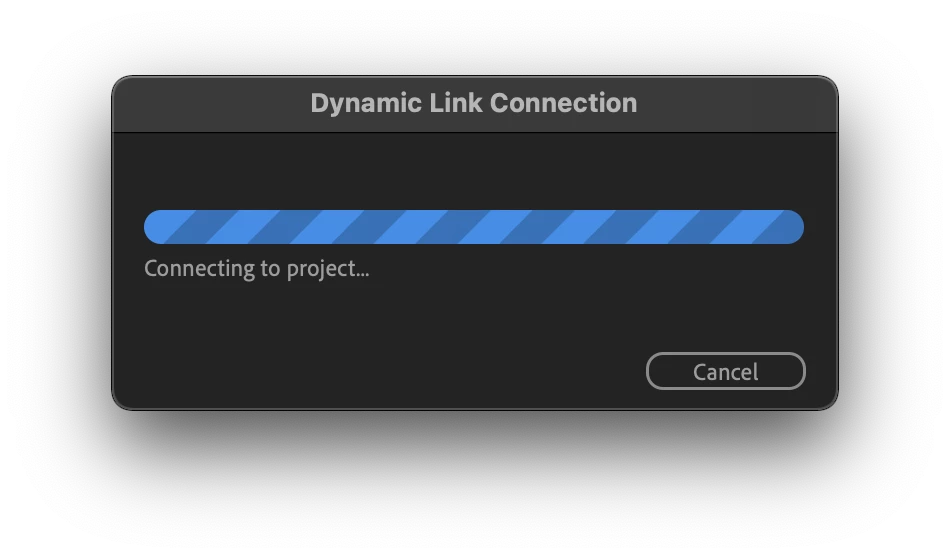


This has been going on for 30 minutes. Every time I try to close the app and reopen it again, the project won't export, then I try to do the queue in AME from AE, but it gets stuck again. WHAT is going on? My career literally depends on this and now its stuck and I have no workaround. GET. IT. FIXED. ADOBE. Your software are incredibly NOT inexpensive so this SHOULD NOT have been a problem. Smh.

This topic has been closed for replies.
Correct answer Aurelien5C67

Hello,


You can downgrade all your software with Creative Cloud :


Install :


Software _____________________________________ ...  <<<< clic on this 3 points / other version.


Choose

PP : 15.4.1

AE : 18.4.1

ME:15.4.1


Hope that help you


10 replies

Participant
January 8, 2022

I'm on a Windows 10 PC and all my exports to Media Encoder 2022 hang with the progress bar just like everyone else is reporting. Why don't we have a fix by now??? Come on ADOBE!

Participant
December 5, 2021

I have the same problem even downgraded ME and both versions not opening now. Imac running bigsur 11.6. 


 This is a major pain in the butt. I have uninstalled even the previous version with no improvement. I will install an earlier version of both AE and ME just in case that fixes the issues.  This seems to be a common issue with ME and AE and I am really hoping that Adobe can understand the frustrations this causes their users who depend on their software for a living.

Participant
December 5, 2021

Likwe most other times that this problem has arisen for me, I have taken the nuclear choice of using the Adobe CC cleaner app. NOT recommended unless all other trouble shooting options have failed.  If you needed to do a complete clean install. This worked for me, so far... Here is the adobe link

https://helpx.adobe.com/creative-cloud/kb/cc-cleaner-tool-installation-problems.html


Read the instructions well before proceeding so you do not inadvertently give yourself more headaches. Both AE and ME are now working as they should after doing a clean install of everything adobe on my machine. NB; during the clean, you have options to just uninstall and fresh clean of specific apps, but this failed for me, so everything (Creative cloud and apps) had to be wiped, then reinstalled. You need time either way to resolve this issue, and that is very rare to come by.  


 One of the older ME installs that I did earlier suggested that the dynamic link modual was not installed on my machine or was not working... I do not know if this was the issue itself or a side effect of trying many different trouble shooting solutions. I hope this helps.

Participant
November 12, 2021

Same thing here, it just gets stuck in linking to project... I had to render from after effects first and then import it to media encoder to transcode... also you downloaded the older version that actually worked lol ... what is the point in doing an "upgrade" that works worse than the previous one adobe? WTF?


Participating Frequently
November 12, 2021

I downgraded After Effects and Media Encoder, and finally was able to export my project. So, the current update is completely useless.


Participating Frequently
November 12, 2021

I'm dealing with the same issue, I'm trying to export something from After Effects, I hit Add to Adobe Media Encoder Queue,  Encoder opens the does NOTHING! I tried using an older version and it will no longer let me, probably unless I downgrade After Effects. Ever time, EVERY DAMN TIME adobe does an update it screw up my computer. How long till this issue gets fixed this time?

Bart De Keyzer
Participant
November 12, 2021

I've just updated After effects this moring and that has seem to done the trick. I exported several animations today via the usual methode and it works fine 🙂

Participant
November 9, 2021

This is an absolute disgrace. I'm now missing deadlines because of the time searching for workarounds to fix software that is costing us all a small fortune. Adding the export to the render queue then chosing the new 'Queue in AME' button in ther render queue DOES NOT WORK. Having two artists spending 2 full days building in AE 2022 means downgrading is not an option right now. Can we all invoice Adobe for our loss of earnings?

valcoholic
Participating Frequently
November 12, 2021

This is absolutely huge. Me as well as my coworker have similar problems. Sending data from After Effects sometimes works, sometimes doesn't. Often I would have to restart, sometimes the only thing that helps is rendering an uncompressed file in AE and then converting this extra in ME, but this also takes so much more time. We're in the middle of hundreds of projects and this broken product literally impacts the whole workflow in the most negative way. 
I guess I have to downgrade both AE as well as ME at some point but right now I already started too many projects with the new version of AE so thats also another problem.

Please put this on high priority and fix this, its really a mess.

And even when I manage to encode videos, they sometimes seem to have some glitches.

Inspiring
November 9, 2021

Same here. I have the amazing new feature that if I kill AME, it POPS BACK TO LIFE and hangs in the same way. Win10 / TR 3960X / 128GB RAM / RTX3070. I'm having to export everything directly from either Premiere or AE.

Damba5C98Author
Participant
November 18, 2021

Ridiculous how they rolled out a completely broken software. I honestly thought my MacBook did not have enough power to render anymore but seeing your comment with 128GB worth of RAM and not being able to render using ME? Its obvious where the common denominator is. Smh.

Bart De Keyzer
Participant
November 9, 2021

I have been able to export as an .MOV directley from AE and convert it to MP4 via an online converter. Far from ideal though but it works for now.

Inspiring
November 9, 2021

you could also use ffmpeg which would almost certainly be faster, it usually rockets through that kind of thing:

ffmpeg -i <yourinput.mov> -vcodec libx264 -acodec aac <outputfile.mp4>


Bart De Keyzer
Participant
November 9, 2021

I'm experiancing the exact same issue, not cool. Hope Adobe is working on the problem.

Aurelien5C67Correct answer
Participant
November 9, 2021

Hello,


You can downgrade all your software with Creative Cloud :


Install :


Software _____________________________________ ...  <<<< clic on this 3 points / other version.


Choose

PP : 15.4.1

AE : 18.4.1

ME:15.4.1


Hope that help you


Damba5C98Author
Participant
November 18, 2021

Sorry this took so long to reply, got caught up with work, but after HOURS of trying to find a workaround I finally decided to ditch the current project I was working on and downgraded AE and ME to the 2021 Version and it worked flawlessly. This really should not have been a problem, Adobe really should put 100% effort before putting out a new version to the public. I'm not upgrading to the 2022 until I know for sure from the public that it actually works. Thanks!

Participant
December 8, 2021

Cannot agree more. Every time Adobe puts out new versions, it's the same painful story- basically everything stops working. Normally I resist updating too quickly but with the multicore render support *finally* in AE I decided to take the chance. Complete regret- I spent days troubleshooting all my adobe software and uninstalling/reinstalling plugins before eventually rolling back to earlier versions. Adobe never make sure their stuff works before rushing it out, and generally the way the company operates just shows contempt for their customers.