


KaupoKuusemae
New Participant
January 9, 2019
Question

Media Encoder keeps on opening "Encoding is in progress. Do you really want to quit?"

  • January 9, 2019
  • 15 replies
  • 11283 views

Hey!

I have a problem. I'm using the latest Adobe Media Encoder 13.0.2 (Build 39) on MacOS 10.14.2. I have i7-7700k with Vega64 and 32GB of RAM..

Problem is that after adding 2 or more items to queue and starting the render process. And after starting queue, the exit promt window pops up.
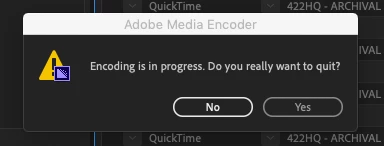
When I press No, it comes back in like half a second. So far have tried to reinstall everything, cleared cache. Problem is still there. Thanks to that it is impossible to leave something rendering over night without some stupid macro workaround method.

Am I the only one who is getting that error?

This topic has been closed for replies.

15 replies

ChannelIslandsRestoration
New Participant
April 18, 2019

Same issue here. I'm on a 2019 MacBook Pro 13".

New Participant
April 10, 2019

Same thing for me, but I'm on Windows and only encoding a single file. On this one I'm exporting from After Effects to Media Encoder. The oddest part is when it does this when exporting from another adobe app, that Adobe App also did it, except I only had the option to save or not and had to close AE.

Maybe something janky with the dynamic link service?

Aldywaani
New Participant
March 28, 2019

Same thing happened to me. Same AME 13.0.2 (Build 39) on MacBook Pro Late 2013 MacOS 10.13.6 High Sierra

This happen only in cc2019 on my client's laptop while doing hundreds of proxies from PPro. But then after all of them finished, Clicking 'No' will exit AME (Crashed)

What i've done and tried is:

  1. Creating hundreds of (1080p ProRes Proxy) Proxies from 4K Footages, inside PPro CC2019 13.0.2 (Build 38), then i quit PPro but keeps AME running. But since it took 4hrs+, we skipped all the remaining progress. And go back to PPro, this cause me to attached Proxies manually on those finished encoding.
  2. Next day, tried to creating Proxy again on other 4K footages inside PPro (But i keep / save the batch list on AME including all the skipped Proxies from yesterday session) Then this Warning Exit Window pop up again and again until today..
  3. Tried to unchecked "Pause Media Encoder queue during playback" inside PPro Playback prefs - but problem still persist.
  4. Sequence Export Queue to AME also will cause pop up warning. (Saved Batch list still on AME)

My AME Prefs are:

  • Unchecked Preview while encoding
  • Unchecked Remove completed files from queue on exit

Rest are default.

No issue on Previous version

I hope support team can recreate the issue

MacBook Pro 15" Late 2013 MacOS 10.13.6 High Sierra

2.0 GHz, 8GB RAM

KaupoKuusemae
New Participant
January 16, 2019

Well, CC2018 AME is slow and hangs while making proxies r doing normal h264 render. CC2019 version of it finally fixed the slowness problem for me, but the fact that I need to be next to computer to make proxies is frustrating.

Made a custom applescript workaround for it (pressing enter every 10 sec, until stopped manually), but this is not the long term solution.

Community Manager
January 9, 2019

Hi KaupoKuusemae,

Sorry for your issue. I understand you are getting exit prompt window while trying to encode multiple files.

Have you tested the issue on a previous version?

Thanks,

Shivangi

New Participant
March 10, 2020

The exact same issue started for me today.  I have a little over a dozen or so files waitign to encode in Adobe Media Encoder 2020 and the popup came up after encoding a few files.  The popup kept coming back after clicking "No."  I have to clock "No" after every file encodes or it won't move on to encode the next one.  


Has anyone found a solution?


I doubt system specs matter becuase it doesn't seem to be isolated to one version, but here they are:

Windows 10 Pro

R9 3950X

Asus X570 Motherbaord

64 GB DDR4 3600 MHz RAM

GTX 1080 ti

1 TB NVMe PCIE 4.0 SSD

1 TB NVMe PCIE 3.0 SSD

2 TB SATA III SSD

8TB 7200 RPM HDD

New Participant
August 21, 2020

I've got this issue at the moment. Did you manage to find a fix for this?