
Inspiring
May 15, 2018
Answered

Media Encoder UI goes unresponsive on latest version

  • May 15, 2018
  • 4 replies
  • 1728 views

Hey all. I have 5 Mac Pros (3.1 and above with a minimum of 24GB RAM) running OSes from El Capitan up to Sierra driven by either GTX 970s or 980s (all 4GB) flashed for Mac. I have never had issues with these in the past. They're all running the latest NVIDIA web drivers and CUDA drivers, rendering on both open CL and CUDA (while I was trying to find the solution), and Media Encoder seems to be doing this weird thing where it will show an active encode for about 5 minutes, and then the UI freezes.

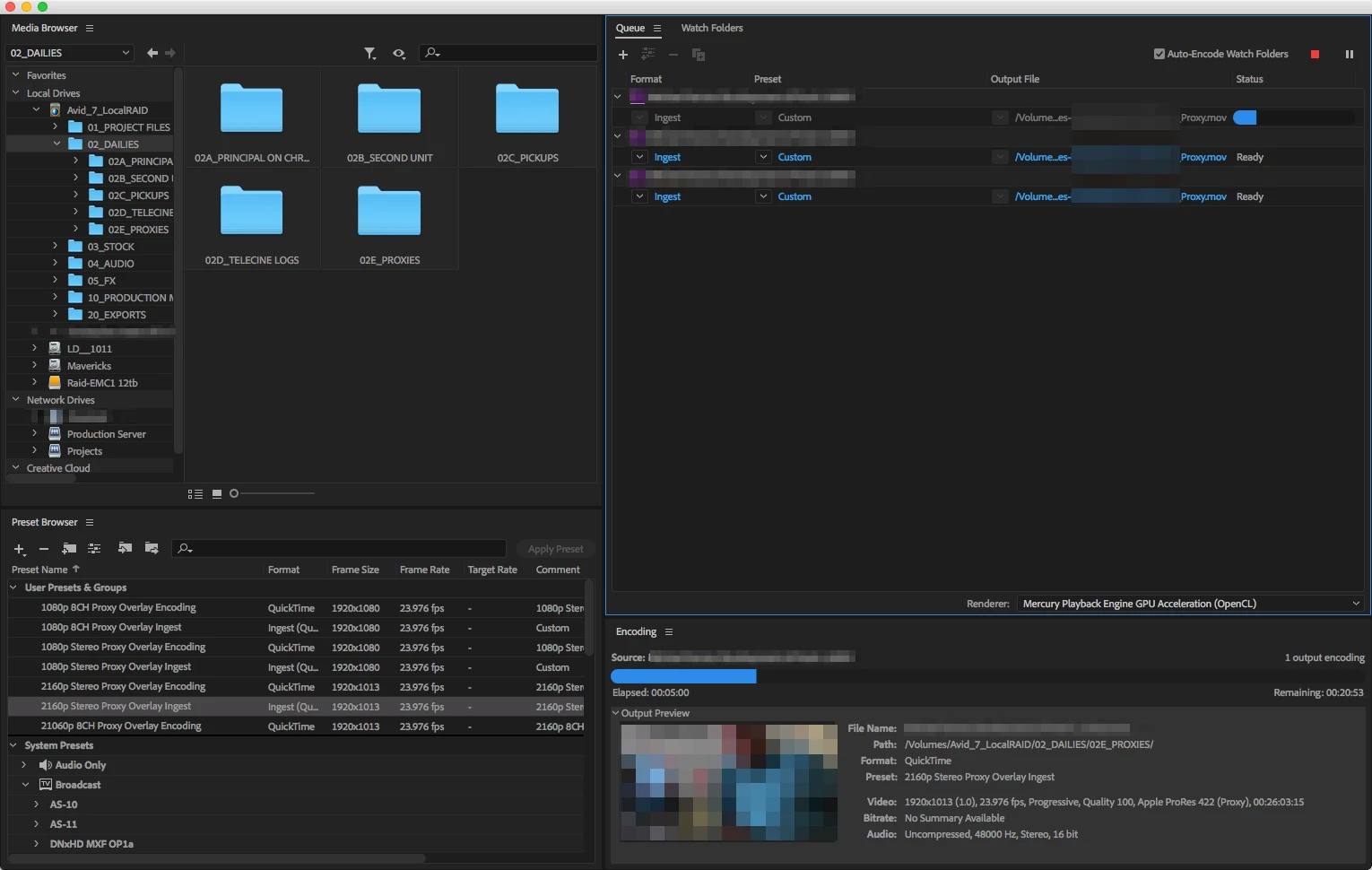
If I check my render destination folder, the files continue to be generated, but AME is unresponsive giving the spinning beach ball (the image below is of the frozen UI at exactly 5 minutes. The finder had completed the first file about 10 minutes before I took this screen shot) Additionally, there seems to be a huge gap between when one file ends and another begins.

The computer I first noticed this on was originally running an ATI Radeon 1GB card producing the exact results I posted above so I thought maybe it just wasn't powerful enough. I swapped it out with a GTX 970 and still got the issue. Split the job up across 5 systems and they all seems to have the same issue.

Has anyone else had this issue on the latest version? Should I try to just install 2017 and see if that works? Problem is I already have a PP2018 started and I am creating proxies. AFAIK there's no way to use AME 2017 to create PP2018 proxies. Rebooting doesn't seem to do anything either. Any help would be appreciated!

EDIT: To make matters stranger, when I command-tab into other apps, the progress bar seems to advance in the app icon - one of my favorite adobe features. Still super slow but it does seem to be more responsive than the app UI. The output file was still complete, though. It's a whole thing that's not making much sense to me. UI frozen, app icon slow, actual computing process works but is slow to start the next file. Am I the only one having this issue? That it's on several systems across several OS versions seems strange.

UPDATE: I ran Preference Manager and trashed all adobe preferences on one of the 5 systems and I am 10 minutes into a queue of a couple hundred clips. These are different clips than I was encoding previously but this batch was having the same UI issues. Will let these go overnight and see what I come in to tomorrow morning.

Update: on my way out the door I noticed that it had frozen again 12 minutes in…

UPDATE: UI is still frozen but the files are still going. Slowly, but going. Someone shared with me that they, too, had this issue and have a thread here showing that Adobe is aware of this issue: Media Encoder CC2018 12.1.1 Build 12 Crashing on Batch Queues 
This topic has been closed for replies.
Correct answer Eaglewood Pictures

The "solution" for now is to downgrade AME to 12.0.

4 replies

Eaglewood Pictures
Eaglewood PicturesCorrect answer
Participant
June 14, 2018

The "solution" for now is to downgrade AME to 12.0.

Participant
June 13, 2018

Hi all,

yes i got stuck on the same issue as well. But then I actually once started a queue and because i have my encoding machine working thru network and screen sharing i forgot to check on it once for some while and when connecting and checking again I realised that even though AME got unresponsive, it still did the job. At the point i had 8 exports in queue and 5 of them were done even though AME said it was stuck. So i left it running along and just watched wether the processor showed activity with AME. Everything got exported fine, so my guess is that due to the heavy work the graphics has to do it just doesn't have the power to keep the preview and front end updated in real time, because when exporting files without any effects or CC the problem did not appear.

Sometimes also it happened that the preview got "updated" and seemed stuck in a different point of the export.

Maybe try to let it run and see wether the files get generated or not even though it seems as if it has crashed.

Additionally I NEVER use the Premiere "send to AME" order, as it seems to juggle the AME settings and f... up things, so I always save the project in premiere and then import it separately into AME.

Petra

Participant
June 8, 2018

Yes, the latest version of AME and Premiere are not jiving well together.  Really stinks that batch encodes do not work in this version.  I usually wouldn't have switched versions in the middle of a big project, but long story short, work was done to close out a project with over a hundred masters to be encoded today and after a night of trying to get it to work I am exporting each natively in Premiere.  I tried going back to previous versions of AME, clearing caches, prefs, reinstalling both, just about everything.  I feel like it must be something in the dynamic linking that originates in PP code as projects in the prev version of PP batch encode just fine.  What also makes me think this as I get a "unknown error" when trying to start the process in AME by importing sequences from projects with PP closed.  I have a similar project coming up and will have to edit in the previous versions unless Adobe has a fix by then.  Ugg so frustrating, seems like with every update for anything these days makes things worse rather than better.  I read a long time ago on one of these threads something that always stuck in my head, something like "OK Adobe, thanks for all the new updates and features, but can you please make PP a reliable program that just works on the basic levels"  Easier said than done I guess...and I am thankful to this software and it's developers for allowing me to do what I do for a living...but this one seems like a major oversight upon release that's causing a lot of people a ton of time and heartache.  Anyways back to "bar-tending"

Participant
May 16, 2018

Yep, this is what's happening with all 5 or more of the on-site, off-site, and home computers I've worked on since the new update.

Also,

I just uninstalled and reinstalled AME, and same problem.

and not just on batch jobs. also on single clip jobs.

I've started to wonder if it's an High Sierra >  AME > External Hard Drive,  compatibility issue but even transcoding to my desktop doesn't make a difference....  idk

I just keep hoping every day I turn on my computer there will be a new AME update fixing this issue

great informative post btw david.

Inspiring
May 17, 2018

I just tried a batch on an earlier version of 2018 and it's chugging away no problem. 100% the latest update. Bummer.

Participant
May 26, 2018

Yes this is exactly what's happening to me too. both when I send to the AME queue to create proxies from PR or even when I just manually import a bunch of files to transcode, AME freezes after 10 or 15 files. So I force quit, reopen and send another 10 over to get transcoded. Its killing me! Any way to downgrade to earlier version?