


Participant
November 7, 2016
Answered

Missing Video Clips when Exporting

  • November 7, 2016
  • 2 replies
  • 5797 views

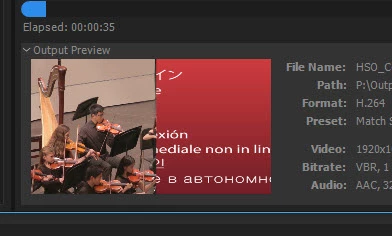
So after upgrading to 2017, I am having issues with encoding videos now.  Basically created a 'split-screen' video, but when I go to encode it to H.264 format, one of the video clips is shown as missing.  Go back to premiere, preview, the whole thing, and it's all there.  Go to export, getting frustrated.

Any one have this happen, have a fix, a workaround?  After working almost 6 hours on this video, bit tired.

Here's a screenshot:
This topic has been closed for replies.
Correct answer Vidya Sagar

Hi Rohlstusk,

In Media Encoder preferences > General > Premiere Pro section > Uncheck "Import sequences natively" option > Click OK.

Queue the export again from Premiere Pro & Render it

Please let us know the status.

Thanks,

Vidya Sagar.

2 replies

michaelcwelch
Known Participant
April 19, 2023

I am having the same exact problem. My work around was to export it out directly from Premiere in it's native format, then drop that video into media encoder. Every signle clip and the font was missing when I sent it directly to media encoder from premiere. Seems like a major bug guys. 

Community Manager
April 20, 2023

Hi Michaelcwelch, 'every single clip and font was missing' that shouldn't be the case. Can you share any further infos or project we can take a look at? Are you running the latest versions of AME, PPro (and AE)?

Dmitri Graf
Adobe Employee
Adobe Employee
November 7, 2016

What's the format of the missing clip? Where did it come from?

Can you add that source directly to AME queue? Does it encode OK?

Does it encode correctly if you export directly from PPro?

RohlstuskAuthor
Participant
November 7, 2016

What's the format of the missing clip? Where did it come from?

- Format is AVCHD file, recorded on Canon Vixia camcorder

- previously never had issues with this file format

- Sequence is DSLR > 1080P > 29.97 FPS

Can you add that source directly to AME queue? Does it encode OK?

- Have not dragged/dropped into AME. Can try this later

Does it encode correctly if you export directly from PPro?

- This is where the issue comes up

- Restarted PP and restarted machine, same issue

- File > Export > Media

Vidya Sagar
Adobe Employee
Vidya SagarCorrect answer
Adobe Employee
November 10, 2016

Hi Rohlstusk,

In Media Encoder preferences > General > Premiere Pro section > Uncheck "Import sequences natively" option > Click OK.

Queue the export again from Premiere Pro & Render it

Please let us know the status.

Thanks,

Vidya Sagar.