
Participating Frequently
June 22, 2021
Question

MP4 terrible quality

  • June 22, 2021
  • 1 reply
  • 1071 views

Hello, I'm having a terrible time exporting an AE animation into MP4.

I was able to export it in a PNG sequence and MOV with no issues, which proves that my file is OK. The issue I'm having is the MP4 file from Media Encoder. (Also from others video converters I found).


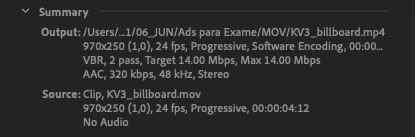
I'm attaching here the print screens. The video above is the MOV, below is MP4, and then you can see the settings I'm using: matching source everywhere, VBR 2 passes with highest bitrate available.



This topic has been closed for replies.

1 reply

Jeff Bugbee
Community Expert
Community Expert
June 23, 2021

MOV and MP4 are simply containers. Those should not dictate the final quality of the video. What codec are you using to encode? I'm guessing the MOV is getting a higher bitrate than the MP4. Can you confirm what the bitrate is on the MOV file, then re-export the MP4 with the same bitrate settings? (instead of using match source for that particular field)

Participating Frequently
June 23, 2021

To the MOV file I exported as Lossless directly from After Effects.

For MP4 I used 14mbps VBR 2pass from Media Encoder.

I'm not sure how to check which codec am I using.

Here it follows the print screens from Media Encoder, using H264 Format. Time interpolation as Frame Sampling (tested with Blending and no better results)


Jeff Bugbee
Community Expert
Community Expert
June 23, 2021

Under Encoding Settings, you need to up the level. 3.1 only supports up to 14mbps. Change it to 4.1 and up your bitrate to match the bitrate that you are exporting your MOV at.


Chart detailing the H.264 levels https://en.wikipedia.org/wiki/Advanced_Video_Coding#Levels