Participant
March 15, 2022
Answered

P: Extremely Slow Render/Export on Adobe Media Encoder 2022

  • March 15, 2022
  • 463 replies
  • 124832 views

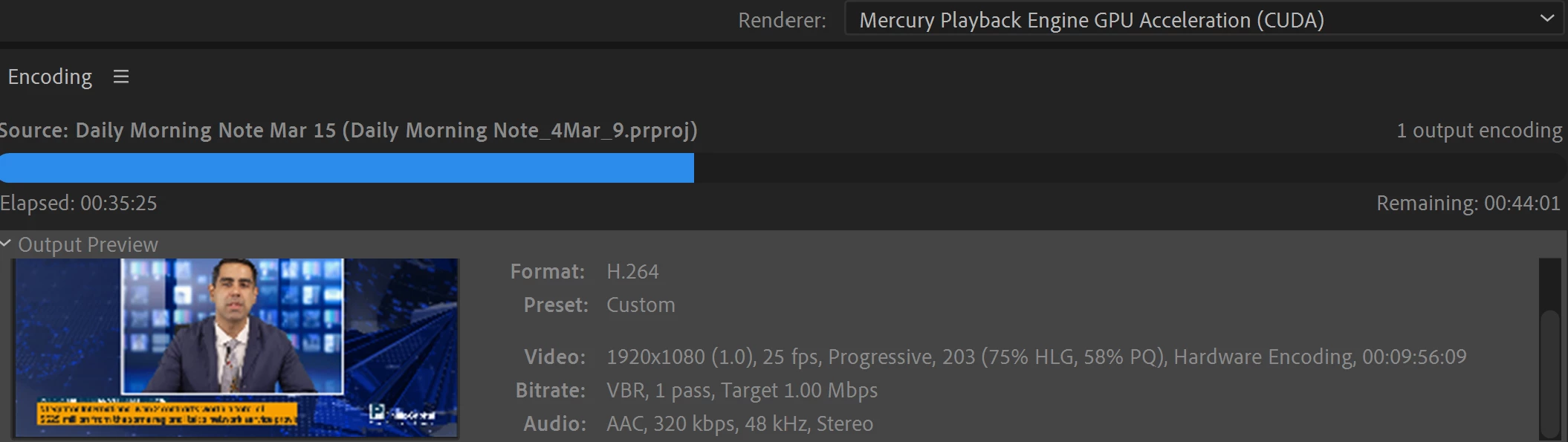
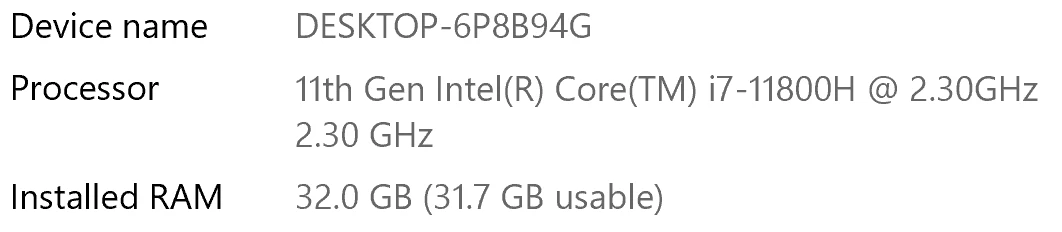
I have been waiting for more than 30 mins for the final video to be rendered. It's already 40 mins and it's barely 50% rendered. Never had this issue before. My laptop specs are as below and my GPU is RTX 3070.


Anyone knows how to solve this sudden issue?


Correct answer Fergus H

Hi all, 
Despite receiving test files from many of you (thank you!), we have not been able to reproduce this problem at Adobe. That's a bit unusual and certainly frustrating - to you and us - but we do think this issue has been fixed in the latest beta of After Effects and Media Encoder. We'd love to get your feedback on that. Creative Cloud betas are specifically designed to run alongside the release versions and are available in the "Beta apps" section of Creative Cloud Desktop. More information is here: https://helpx.adobe.com/x-productkb/global/creative-cloud-beta.html

The v23.x beta of After Effects also has the ability to directly export H.264 - without having to use Media Encoder - so your feedback on this would be useful too. More information is available here: https://community.adobe.com/t5/after-effects-beta-discussions/feature-focus-exporting-h-264-from-the-after-effects-render-queue/td-p/13117618


Regards,

Fergus

463 replies

Participant
July 26, 2022

Hi,

Same here, rendering 5min video (with After Effect dynamic links) 8hours and remaining is 40+h. 

Software Only - 8 hours and the remaining is 40+h (after 8 it probably gets stuck too, bcs it was not moving quite a while)

Hardware accelerated - after 20-30min it always gets stuck. The remaining was 6h. 


Macbook 16"

M1 Pro

16GB RAM 

1TB SSD

------------------------------

Premiere, AE,ME 2021 is running relatively fine. (for Adobe).

But 2022 project was handed to me, and I am disgusted. 


Participant
July 27, 2022

Same Here!!!!!!

Participating Frequently
August 24, 2022

I had the same problem. Media encoder took estimated time remaining 2 hours on a small file.  But Battle Axe's Anubis saved me. Render in less than 4 min

https://www.battleaxe.co/ This plugin with AE is magic. The best $20 I have ever spent 

Media Encoder can go suck an egg. 


Adobe Employee
March 18, 2022

Hi there,


Sorry to hear about this. Please let us know the type of media files you have used (format/codec, frame rate & frame size) & the effects applied.


Thanks,

Sumeet

Participant
March 21, 2022

Hello, I have a similar issue. 

I simply had to cut down a gif to conserve a bit of space, The final video lasts 13 seconds. It took over 2 minutes to render it using hardware encoding with an RTX 3070. I used the H.264 format, like I have with all previous projects. The output framerate is 15 fps, and the frame size is 1604x828. I applied no effects, since I only had to cut the gif a bit shorter. This is a problem i've only encountered this one time, as all previous projects I rendered with higher quality targets rendered much faster.

Kevin J. Monahan Jr.
Legend
July 29, 2022

Sorry about that taylorbenniefaull.
If you have time, you may want to reinstall the previous version to see if your expected performance returns. Depending on your system, the previous version might be more performant. Let us know if the advice helped you or not.


Thanks,
Kevin

Kevin Monahan - Sr. Community and Engagement Strategist – Adobe Pro Video and Audio
Participating Frequently
November 14, 2021

Adobe media encoder has become a joke of a software and I can barely use it anymore, it hold me back from reaching deadlines and therefore from making money...it's taking 23 hours to render an 8 minute composition please find a fix for this and don't sweep it under the rug

Adobe Employee
November 1, 2023

Please provide details so that we can help you: What CPU / Source Material / Preset? Which workflow (AME, PPro > AME, After Effects > AME)?

Inspiring
November 7, 2021

I just notice on my 10 core cpu that when I reduced the threads it did a render that said it still needed 15-20 minutes in 2 minutes. When I used my 4-6 core processors it often only used 20-60% op the cpus the render times were slower but not slow enough that I am seeing an increase in rendertimes at this capacity with esentially the same threads I believe a good hardrive does wonders but not much is happening on the hard drive either.

Participating Frequently
November 2, 2021

Well it's November 2021 and this is still happening. Rendering a 5 second video, very little animation and Media Encoder is still "Reading XMP" for the last 10 minutes. 

Inspiring
October 15, 2021

October 2021, Still now fixed for me too.

Participant
June 24, 2021

I have the same problem. I'm on a pretty new mac laptop (OS Big Sur) that's as maxed out for video editing as one can get and while I'm used to it struggling with some bigger projects, it's clear the problem this time is media encoder because when I export from after effects my renders are taking  closer to their usual time. However I have over 200 30ish second videos I need to export, and doing them one by one through after-effect isn't gonna cut it, I've tried changing my media encoder settings, and switching codecs to apple pro res 422 but it's still taking forever even to export a 20 second video with nothing but some color correction and a mask on it. I can't even go back to the old version of media encoder because its no longer appearing in my creative cloud. 

Adobe needs to hurry up and figure out a fix for this problem because it's ridiculous and is making it literally impossible for me to do my job. I Have several longer 30 minute videos I need to start working on soon and I dread to even imagine how long their render times are going to be if this problem isn't fixed. 

mike59999
June 26, 2021

Performace is garbage.  I make videos on youtube...intro sequence from after effects (i just change text)...10 seconds...60 fps. 


Since these last several updates this ten second clip that used to take less than 30 seconds now takes 25+ minutes.  Same custom settings as before (h.264, hardware encoding, vbr 1 pass @ 120).  tried switching to h.265...also dirt slow.


using an i9-9900k, dual titan xp's, 64g ram, m.2 ssd for files and a separate m2 for cache.


I have aida64 on a second monitor...during the encode both gpu usage reads as 0% and my CPU usage remains within the normal fluctuations it has and percent usage @ idle (and i am looking at all the cores).  


oliviah16679408
Participant
May 5, 2021

Absolutely awfull. Hadn’t used ME since the last update and it obviously has to doo with exactly that: the update. A 10 second video from After Effects took 1 hour and 30 minutes and the video is literally just text gainig opacity and an icon moving through the screen... HOW?! Thank god I have only needed it one time since then, I will now update the newest 2021 version and really hope that issue is gone. Do better people.


Participant
April 28, 2021

I can confirm that this issue is still there in Adobe Media Encoder 2021. 
I'm running an i9-9900k at 5Ghz, 32GB Ram, RTX 2080 and all of my footage is 1080p MP4 running from a Samsung NVME drive.


A project that used to take 5 minutes to export now takes 50 - 60 minutes.

I've started moving all of my editing to Davinci Resolve which rendered the same project with the same files in 2mins 30seconds.

Adobe has been awful since 2020 and I will be cancelling my subscription! I see no advantage in any of their systems any more. They're all slow, cumbersome and constantly crashing. There are so many better and cheaper alternatives out there now! What's the point in Adobe!

Participant
March 17, 2021

Adding my experience here, AME experience has been pretty bad for me. The rendering speed is OK at the start, but gets slower and unbeareably slow towards the end. Something is not right here, I switched to a cheap alternative encoding software, it took only a few minutes for my purposes.