Participant
March 15, 2022
Answered

P: Extremely Slow Render/Export on Adobe Media Encoder 2022

  • March 15, 2022
  • 463 replies
  • 124832 views

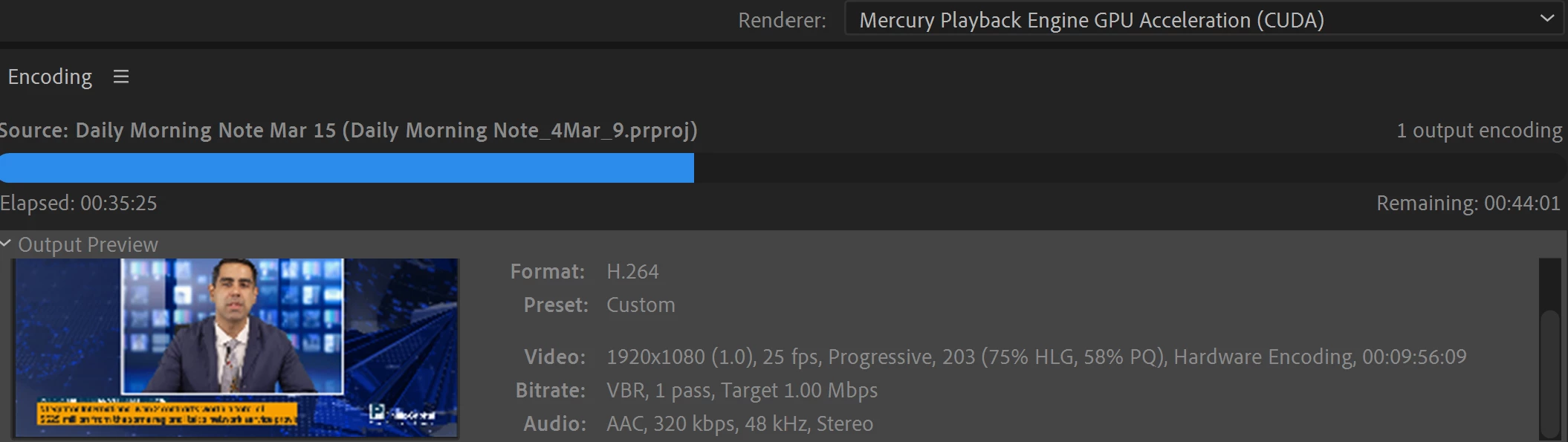
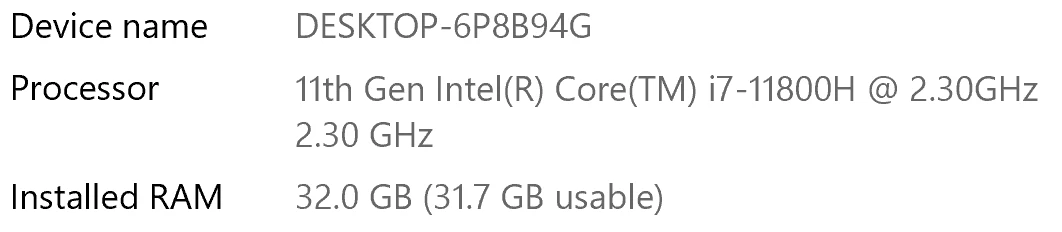
I have been waiting for more than 30 mins for the final video to be rendered. It's already 40 mins and it's barely 50% rendered. Never had this issue before. My laptop specs are as below and my GPU is RTX 3070.


Anyone knows how to solve this sudden issue?


Correct answer Fergus H

Hi all, 
Despite receiving test files from many of you (thank you!), we have not been able to reproduce this problem at Adobe. That's a bit unusual and certainly frustrating - to you and us - but we do think this issue has been fixed in the latest beta of After Effects and Media Encoder. We'd love to get your feedback on that. Creative Cloud betas are specifically designed to run alongside the release versions and are available in the "Beta apps" section of Creative Cloud Desktop. More information is here: https://helpx.adobe.com/x-productkb/global/creative-cloud-beta.html

The v23.x beta of After Effects also has the ability to directly export H.264 - without having to use Media Encoder - so your feedback on this would be useful too. More information is available here: https://community.adobe.com/t5/after-effects-beta-discussions/feature-focus-exporting-h-264-from-the-after-effects-render-queue/td-p/13117618


Regards,

Fergus

463 replies

0_latetotheparty_0
Participant
December 2, 2020

Same issue here!!  I was shock to find that a 53 sec comp  exporting H.264 1080p 23fr would take more than 2 hrs with out third-party plug-ins, no heavy effect, no audio and no colour correction. 

Whats even funnier is that it says " QUICKLY OUTPUT video files for virtually any screen." The irony!!

iMac,

Processor: 4GHz Quad core Intel core i7

Memory: 32GB 1600MHz


Participating Frequently
November 25, 2020

Same issue here.  I think it might have something to do with a change to the H.264 encoder, but I could be wrong.  Something changed in the jump from 14.4 to 14.5, and the only solution right now is to revert to 14.4.  Please fix this ASAP, Adobe.  As soon as I'm not able to use that version, I don't know what I'm going to do.

Participating Frequently
November 25, 2020

Just for an example, I just started a render of a low resolution H.264 proxy on Media Encoder 14.6.  It told me it was going to take 5 hours, and the time kept on climbing.  Reverted back to 14.4, and now it's going to be done in around 40 minutes.  I can provide screenshots if that would help.

Participating Frequently
November 25, 2020

This is workflow-breaking, guys.  Please prioritize.

fady201214
Participating Frequently
November 23, 2020

Really Frustrating !!

A 2min16sec timeline in after effects (with no plugins, no color effects, and no 3D, etc..)  is taking 5h13min to render in H264 - 1920x1080 ... seriously !!


specs

iMac

  Model Identifier: iMac18,3

  Processor Name: Quad-Core Intel Core i5

  Processor Speed: 3.4 GHz

  Number of Processors: 1

  Total Number of Cores: 4

  L2 Cache (per Core): 256 KB

  L3 Cache: 6 MB

  Memory: 32 GB

fady201214
Participating Frequently
November 25, 2020

I Finally downgraded ME from V14.6 to V14.4 and miraculously the 5:30 hours render time are down to 1:16h !!!!! 


Participating Frequently
June 24, 2021

Hey,

I also have the same issue with ME, rendering a 10 second long video took 3 hours could you give me a link to version 14.4 I couldn't find it anywhere.

Thanks

psiconautah
Participant
November 16, 2020

SAME PROBLEM HERE, THE LAST VERSION OF ENCODER REALLY SUX, 3 HOUR FOR 15 SECONDOS IN RENDER, ON A NEW MACBOOK PRO 17 , REALLY?? SOLVE THIS CRAP 

Participant
November 12, 2020

Just now, I have finished rendering a 1 hour composition in Adobe Media Encoder. It took approximately 23 hours to render. I have no idea why this would happen. My computer is considered to be "high end" with an intel core i7-9700K and 16 GB of ram. I have an RTX 2080 as well. Please tell me what I am doing wrong. Thanks

gupta shivangi
Legend
July 3, 2020

Hi Jon,

We're sorry about the issue and appreciate the fact that you tried to troubleshoot it before reaching out. The system details that you've shared look good enough. However, we'll need more information to optimize the performance.

  • Which OS version do you have?
  • Does it happen with every project?
  • Which effects are applied to your composition?
  • Have you used any third-party plug-ins in your project?

Looking forward to your response.

Thanks,

Shivangi

August 15, 2020

Adobe wt... I ahve deadlines and your media encoder is has suddenly taking 10-15x longer to render or it just stops with no error. Fix your software and you owe $52 for a new external hard drive and $130 for a lost client!

gupta shivangi
Legend
August 25, 2020

We understand any delay in meeting the deadlines could cost you time, efforts and money. Do not worry! We're here to help.

Could you share the details I've asked above? It is important to know about the computer's hardware and the project's complexity while troubleshooting the performance related glitches.

Looking forward to your response.

Thanks,

Shivangi

Participant
July 2, 2020

Media Encoder 2020 render extremely slow

Same problem here, out of nowhere rendering in the timeline and exporting from both Ae and AME started taking much, much longer. What would usually take 1-2 mins is suddenly taking 30 - 40. I updated to Ae 2020, no change, updated my graphic drivers, no change. Tried rendering with mercury software only rather than GPU, hasn't made any difference.

I have 12 core, 64 gigs Ram, Nvidia 1080 Ti, I don't really see why it should be struggling like it is. At one point I couldn't even use masks in Ae because the lag was so bad it made it impossible to work.

Its really frustrating to go from a relatively great workflow to something that is, at times, barely usable.

Any advice or fixes on this would be greatly appreciated.


Title edited by Mod

Amy the Stuv
Community Manager
Community Manager
October 2, 2026

Hi ​@jon55 

We merged your post here as this is the most active current thread to this issue. This will help us provide everyone who experienced this issue with the latest updates more easily and help pool together the information pertinent to the issue.

Thank you for brining this to our attention.

Amy

gupta shivangi
Legend
March 25, 2020

Hi there,

Thanks for writing in. The performance should be not be an issue with the kind of hardware specifications that your computer has. However, we'll need to dig deeper to figure out what's causing problem.

Could you share a screenshot of the AME workspace? I'd like to see which video renderer is being used.

Also, what happens when you try to render the project from After Effects?

Let us know.

Thanks,

Shivangi

matthewf38320796
Participant
August 13, 2020

I am having the same issues.  My Macbook Pro specs are below.  For a 5 minute video in AE, it's taking over 7 hours and still not done in media encoder.  I'm on the latest mac os, and latest Adobe CC.


Participant
March 24, 2020

Adobe Media Encoder extremely slow on rendering from After Effects

I'm a freelance video-editor/animator that's hit a technical snag. I've been using Adobe Media Encoder to export my projects from both Premiere and After Effects every week and I usually never have a problem with it. My computer is (all the details in case it matters):

iMac (Retina 4K, 21.5inch, 2017)

Processor 3.6 GHz Quad-Core Intel Core i7

Memory: 32 GB 24000 MHz DDR4

Startup Disk: Macintosh HD

Graphics: Radeon Pro 560 4 GB

and I just upgraded to Catalina (version 10.15.3)


Today I went to export a simple 1-minute video in After Effects through Adobe Media Encoder (H.263, YouTube 1080p Full HD setting) and have been baffled all night why it's taking so long to render. The entire video only has 6 basic comp animations, and I normally render something like this in 8 minutes, but this video is taking so far... 50 minutes?


I've stopped it a number of times because I thought it was so peculiar. I made sure Adobe Media Encoder and After Effects were updated, then I restarted my computer and tried again only to find the same problem. I was sure that updating the programs so they were up to date with Catalina would solve it. But this seems really funky. 


Has anyone else encountered this with Media Encoder? Does anyone have any hunch what might be causing it? Any and all help is greatly appreciated.


Amy the Stuv
Community Manager
Community Manager
October 2, 2026

Hello ​@LadyBaaBaa 

I merged your post to this thread to gather together all of the information pertaining to this issue in one location and to make it easier for you to receive updates regarding your post.

Thank you for bringing this to our attention,

Amy