
Participant
June 3, 2017
Question

Rendering Issue

  • June 3, 2017
  • 3 replies
  • 470 views

Hello there.

I'm trying to export/render out a video meant for Youtube that's an hour and 35 minutes long. However despite several attempts, the end result is always a blurry, ugly mess. What can I do to fix this? Is it my settings? If so, here's what I have everything set to:
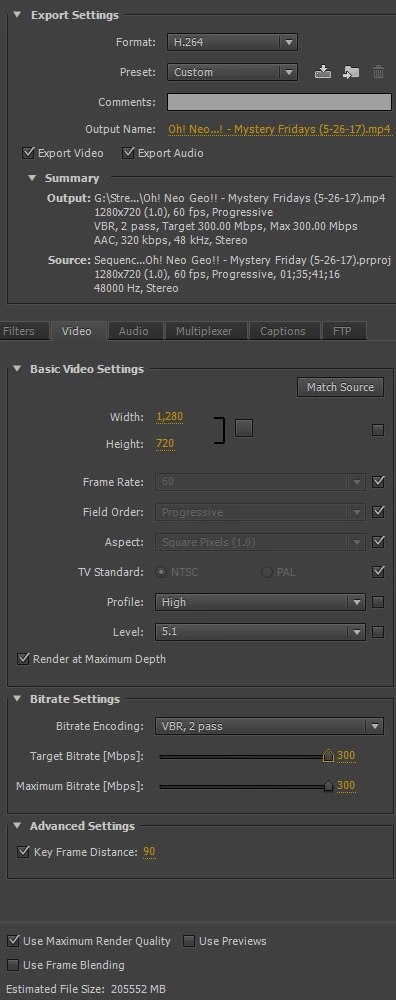
Is it the bit-rate (it's definitely the bit-rate isn't it)? Should I lower it? Anything I should untick like Maximum Render Quality? Please help me out, the rendering takes three hours and I can't waste my days trying to get this right by making shots in the dark.

Thank you.

This topic has been closed for replies.

3 replies

Nexahs1138
Inspiring
June 6, 2017

Reset those settings and only change the format and preset, there's no need to change anything else.

Screaminglion
Participant
June 6, 2017

There is a help page for youtube encoding:

Empfohlene Einstellungen für die Upload-Codierung - YouTube-Hilfe

In your case you'd want to lower "level" to 4.1 - according to the profile list even 3.2 should work for a 1280x720 video:

H.264/MPEG-4 AVC - Wikipedia

As for the bit rate - I suggest 7,5 (target) to 10mbps (max). A 10 to 20 setting will yield better results (but sizes up the videofile).

You should only check "Use Maximum Render Quality" when you are resizing a video, because it really takes a lot of render time and won't help you at all if you aren't resizing (like from a 1080p to a 720p video).

If you are looking for a shorter render time use VBR 1pass. If you are looking for more quality use VBR 2pass (but will render about twice as long).

With projects this long you should always try little snippets first before going for the whole movie.

Good luck!

CrowBro2Author
Participant
June 6, 2017

Ok, so I took two shots in the dark with the bitrates, but the output is still a very low-res, blurry 1GB video.

Anyone got any suggestions at all?

Participating Frequently
June 6, 2017

Please repeat after me. More is not always better. More is not always better. More is not always better ;-)

300mbps is an extremely high bit rate for an .mp4 file. Try this with a short sample of your footage - choose the YouTube 720p preset under H.264 and see how that looks. You have to scroll all the way down under presets to find it. You just may be pleasantly surprised, as the bit rate is only 16mbps, but is appropriate for YouTube footage.

Thanks

Jeff Pulera

Safe Harbor Computers

Nexahs1138
Inspiring
June 6, 2017

Or press the up arrow on the keyboard, that gets you there quicker