
ninocantando
Participating Frequently
May 16, 2017
Answered

Some audio clips don't sound when I export a Premiere Pro project

  • May 16, 2017
  • 1 reply
  • 1386 views

Hello!

I'm using the version CS6 (in both Premiere and Media Encoder)

Sometimes I put a voice clip and a music file "one above the other" in a Premiere project, so that they sound at the same time (something like this, don't pay attention to the language haha):
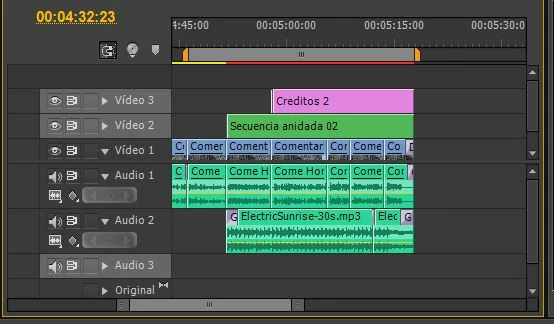
...But my problem is that Media Encoder sometimes makes both of them sound, and sometimes it makes only the voice sound; in the final exported video.

I literally just exported the video twice, and the first time the music didn't sound but the second time it did...

I have no idea what's going on, am I doing something wrong?

Hope you can help me out because this really is a problem, since exporting the video takes quite a long time.

Thanks!!

This topic has been closed for replies.
Correct answer Peru Bob

Make sure that the music is a wav file, not an mp3 file.  Convert mp3 to wav before importing into Premiere Pro if necessary.

1 reply

Peru Bob
Community Expert
Peru BobCommunity ExpertCorrect answer
Community Expert
May 16, 2017

Make sure that the music is a wav file, not an mp3 file.  Convert mp3 to wav before importing into Premiere Pro if necessary.

ninocantando
Participating Frequently
May 16, 2017

Oh, okay... And why's that? What's wrong with MP3 files?

Peru Bob
Community Expert
Community Expert
May 16, 2017

Some (but not all) users have experienced odd behavior when using mp3 files, including playback and export problems.

I have had a few projects where I have not converted mp3s to wav and had problems.  After substituting wav files converted from the mp3s files, the problems were fixed.