



Akeblay
Known Participant
August 29, 2018
Answered

White changing to Off White in GIF Export

  • August 29, 2018
  • 4 replies
  • 4395 views

When I export my GIF it changes all my backgrounds from white (FFFFFF) to just barely off white (FBFBFB).

I have tested this with video exports and it's all fine, I have changed EVERY setting that can be changed, and nothing.

Here is my desired export setting:
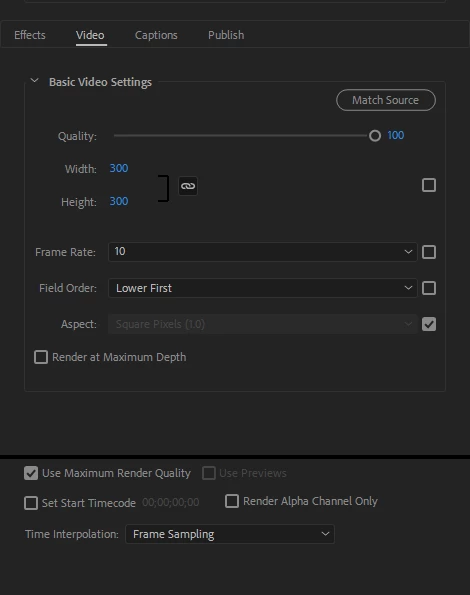
Unfortunately as I'm trying to place these GIF images on a white website, the off-white background does not work for me, I'm at a loss!

    Correct answer Kevin-Monahan

    C. Blake,

    I have heard about this recently. It's definitely a limitation of the application right now I'd classify as a bug. Kindly report that here: Media Encoder: Hot (156 ideas) – Adobe video & audio apps

    Sorry for the frustration.

    Kevin

    4 replies

    Participant
    May 29, 2024
    Participating Frequently
    March 13, 2025

    Amazing, that did the trick but...what's the cause of this?

    dunnbymatt
    Participant
    December 4, 2018

    I had the exact same issue with Media Encoder 12.1.1.12 and 13.0.1.12.

    I spoke to Adobe Tech Support and they said it was a known issue and is being worked on. The solution was to roll back to the 2017 version of both AE and AME then try again.

    It's simply ridiculous to have a known bug that is a fundamental mistake and not patch it yet update the software for 2 more years.

    Kevin-Monahan
    Community Manager
    Kevin-MonahanCommunity ManagerCorrect answer
    Community Manager
    August 30, 2018

    C. Blake,

    I have heard about this recently. It's definitely a limitation of the application right now I'd classify as a bug. Kindly report that here: Media Encoder: Hot (156 ideas) – Adobe video & audio apps

    Sorry for the frustration.

    Kevin

    Kevin Monahan - Sr. Community & Engagement Strategist – Pro Video and Audio
    jeroenr92072295
    Inspiring
    July 29, 2020

    Hi Kevin,


    I am aware that this is an old issue, but it is one that hasn't been solved yet. Also, this issue has been reported on the UserVoice platform: https://adobe-video.uservoice.com/forums/911308-media-encoder/suggestions/36182734-media-encoder-v13-0-1-exporting-gifs-change-all-co.


    Two years later, this issue is still present. What about implementing a Photoshop-esque color conversion table, so we have more control over the colors being used when exporting to GIF? This way, we can at least correct colors that we want to be absolutely as designed.


    Jeroen

    Brandon Loshe
    Legend
    August 30, 2018

    Hi C. Blake,

    I'm not sure why that is. Personally, I've had better luck doing doing GIFs in Photoshop, and then exporting inside Photoshop itself. I assume that you're trying to take a video or series of pictures, then and export as a motion GIF? I stumbled upon a similar issue, which can maybe help you investigate further:

    white background converted in #fbfbfb

    Does any of this help?