
ALainhartBentoATL
Participant
July 27, 2018
Answered

Why does Media Encoder take up so much memory? PProHeadless tasks take up too much memory.

  • July 27, 2018
  • 1 reply
  • 3615 views

Hello,

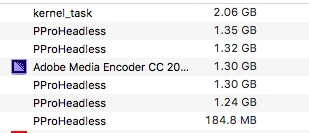
I typically do a lot of little exports from a single edit and use AME to queue them for one session of export.  Didn't used to have a problem with memory, but lately if I do 1/2 as much at a time as I used to my 32GB RAM computer runs out of memory.  I've noticed that if I open up Activity Monitor, AME creates a PProHeadless task that takes up about 1.30 GB per video clip I'm trying to export.  These PProHeadless tasks don't go away after a clip is done exporting and just keep stacking up until all memory is gone.  Is this an error on AME's side?  How can I get AME to stop stacking PProHeadless tasks that don't seem to be needed anymore after the clip is finished exporting?
Thanks,

This topic has been closed for replies.
Correct answer Vidya Sagar

Hi ALainhartBentoATL,

Sorry for the trouble. PProHeadless functions read Premiere sequences for other programs. It this case, the processes are not getting terminated for some reason.

What are the system specs(OS, RAM, GPU, CPU)? Are you logged in as an Administrator in the OS?

Try resetting the Media Encoder preferences: Media Encoder Help | Set preferences and check the issue.

Let us know the status.

Thanks,

Vidya

1 reply

Vidya Sagar
Adobe Employee
Vidya SagarCorrect answer
Adobe Employee
August 14, 2018

Hi ALainhartBentoATL,

Sorry for the trouble. PProHeadless functions read Premiere sequences for other programs. It this case, the processes are not getting terminated for some reason.

What are the system specs(OS, RAM, GPU, CPU)? Are you logged in as an Administrator in the OS?

Try resetting the Media Encoder preferences: Media Encoder Help | Set preferences and check the issue.

Let us know the status.

Thanks,

Vidya