
November 30, 2017
Answered

Zoomed M2V files

  • November 30, 2017
  • 1 reply
  • 734 views

When transcoding MP4 video files into M2V files using Premiere Pro (CS6), the resulting video appears zoomed:
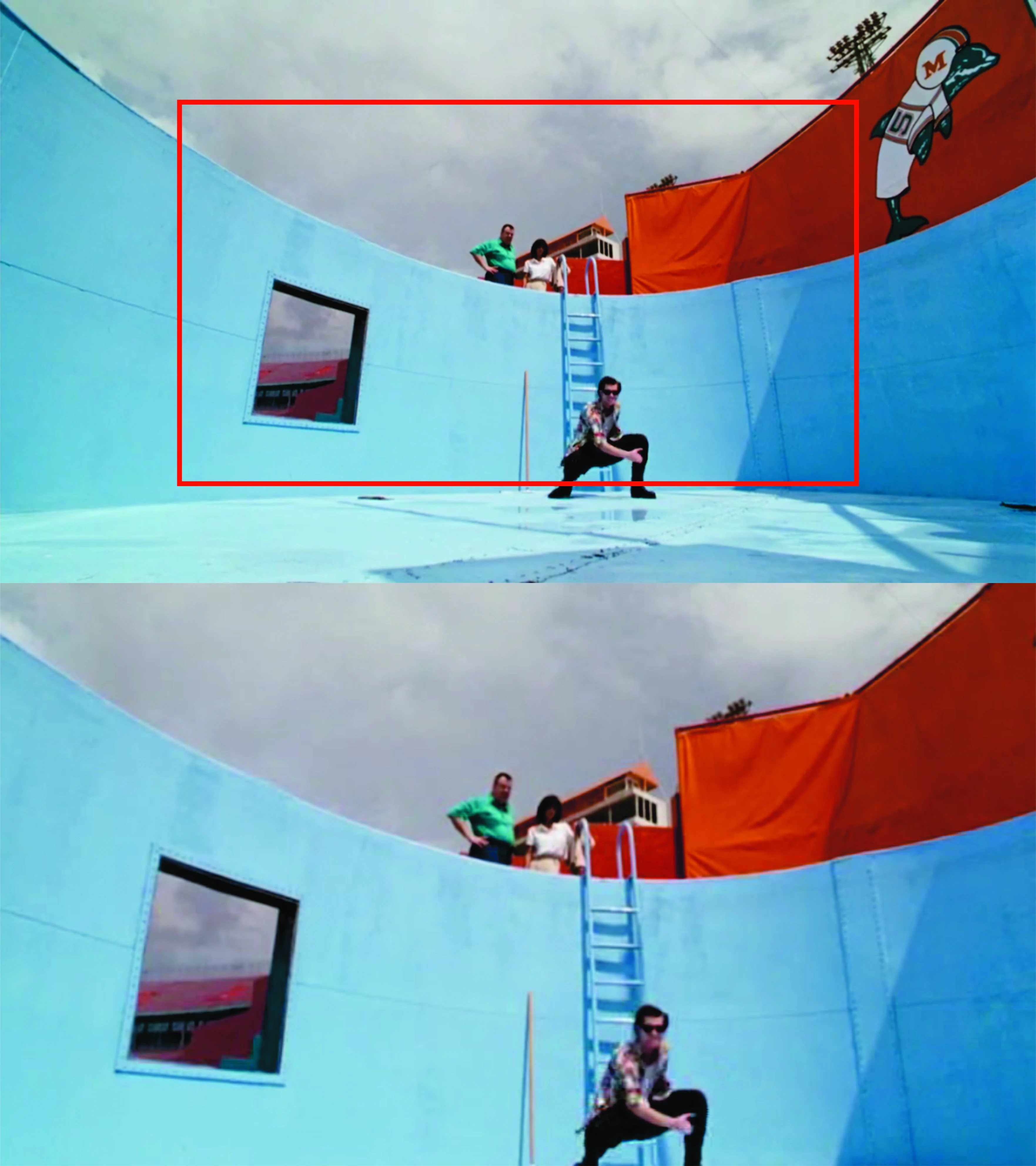
Windows media player, VLC and Splayer all show the same zoom, which implies its not an issue with the media player. Any suggestions on how to solve this?

This topic has been closed for replies.
Correct answer SAFEHARBOR11

Where does the red box come from, or did you add that for illustration of the issue?

You must have a settings mismatch somewhere. For instance, if the source clip is 1920x1080, and sequence is 1920x1080, and export is 1920x1080...there should never be any issue like you are seeing. Something is mismatched along the way.

When you drop the clip into the timeline, do you see the entire image in the Program Monitor window, or is it cropped there? What you see in that window is what you ought to get at export as well.

Thanks

Jeff Pulera

Safe Harbor Computers

1 reply

SAFEHARBOR11Correct answer
Participating Frequently
November 30, 2017

Where does the red box come from, or did you add that for illustration of the issue?

You must have a settings mismatch somewhere. For instance, if the source clip is 1920x1080, and sequence is 1920x1080, and export is 1920x1080...there should never be any issue like you are seeing. Something is mismatched along the way.

When you drop the clip into the timeline, do you see the entire image in the Program Monitor window, or is it cropped there? What you see in that window is what you ought to get at export as well.

Thanks

Jeff Pulera

Safe Harbor Computers

November 30, 2017

"did you add that for illustration of the issue?"

Exactly, the upper image is the source MP4 file and the lower 1 is the transcoded M2V file.

"You must have a settings mismatch somewhere. For instance, if the source clip is 1920x1080, and sequence is 1920x1080, and export is 1920x1080...there should never be any issue like you are seeing. Something is mismatched along the way."

yeah, this window popped up and i kept ignoring it, selecting "change sequence settings" solved the issue.

"When you drop the clip into the timeline, do you see the entire image in the Program Monitor window, or is it cropped there? What you see in that window is what you ought to get at export as well."

thanks for the tip

Participating Frequently
November 30, 2017

To avoid this issue moving forward, right-click the video clip in the Project Bin and select New Sequence From Clip. That will ensure that the sequence matches the clip for best results

Thanks

Jeff