Daniel Consid
Participant
August 28, 2018
Answered

1px strokes sometimes becomes 2px thick

  • August 28, 2018
  • 1 reply
  • 1404 views

Hi,

I have a problem with stroke widths. Even though they're set to be 1px thick they sometimes become 2px thick wide - visually.

Please see this screen capture:
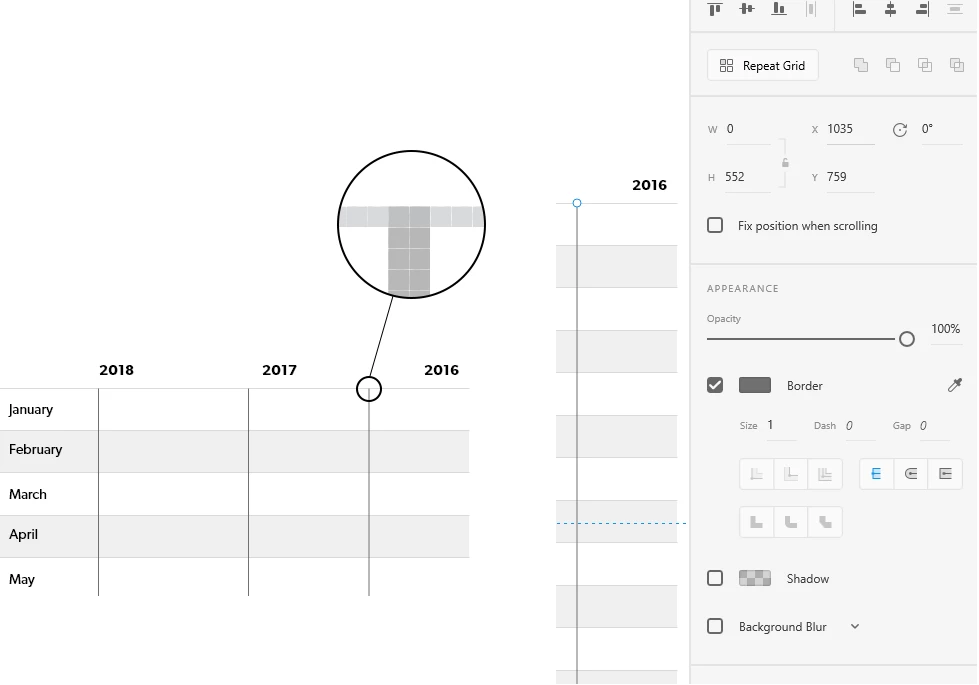
Maybe it has something to do with half pixels. Is there a way to turn them off?

Anyone else experiencing this issue? I'm looking for solutions!

I am using the latest version of Adobe XD on Windows 10.

Thanks!

Regards,
Daniel

This topic has been closed for replies.
Correct answer CoreyRLucier

Make sure your line is aligned to the pixel grid. Select your line and use the Object->Align to Pixel Grid menu option.

1 reply

CoreyRLucierCorrect answer
Adobe Employee
August 28, 2018

Make sure your line is aligned to the pixel grid. Select your line and use the Object->Align to Pixel Grid menu option.

Daniel Consid
Participant
August 28, 2018

Thank you! Will there be a way to always align objects to the pixel grid eventually?

Adobe Employee
August 28, 2018

When drawing lines they should always be pixel snapped.  e.g. In your case with 1px stroke it would default to be on the 1/2 pixel so that 1/2 + 1/2 (the stroke on either side of the line) is nicely pixel aligned.

Perhaps you nudged the line somehow to a whole pixel or perhaps snapped to some other object when drawing inadvertently ?