March 2, 2019
Answered

About the height of text, what's wrong with it?

  • March 2, 2019
  • 3 replies
  • 23987 views

I wrote something and found the height of text is strange.

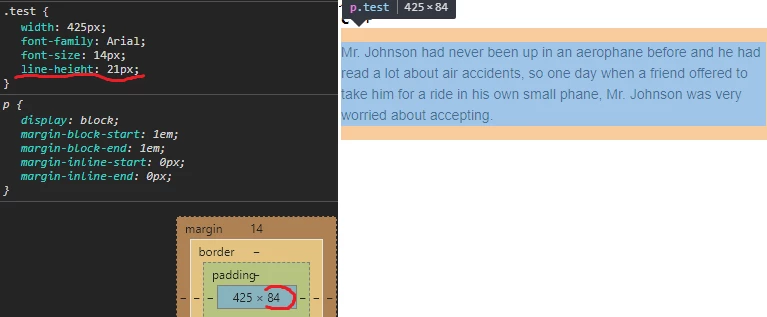
As you can see on the images:
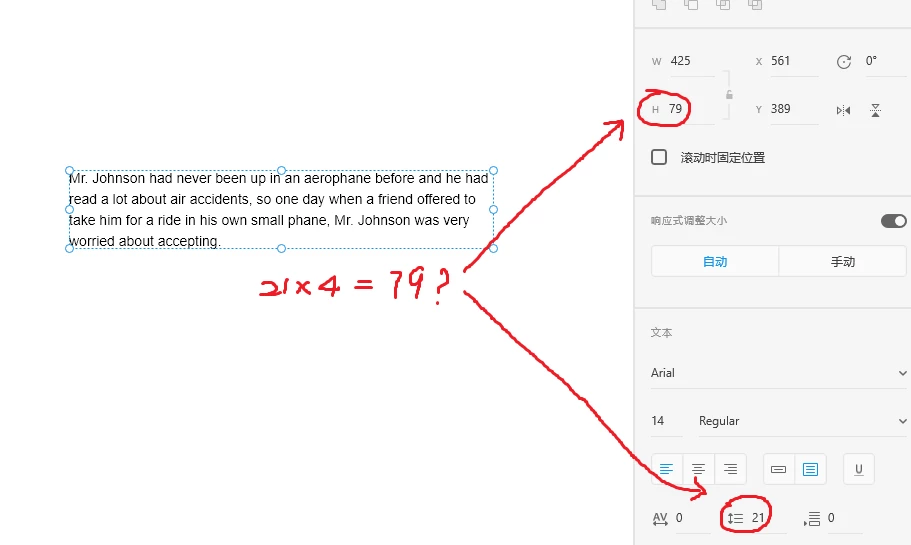
The height calculation is very different from web browser, it has a certain amount of error.

Why became this & how can I fix it ?

I used a plugin "text toolbox" but doesn't help.

This topic has been closed for replies.
Correct answer Dan Rodney

While CSS line-height allows for many types of values (pixels, percent, unitless, etc.) the line-height that XD uses is pixels. On the web text sits vertically aligned within the allotted line-height (so space is above and below the text). In this case the 14px type sits within 21px of line-height, but XD is not giving a box height that matches what one would expect via CSS.

3 replies

davidp19825766
Inspiring
June 6, 2020

I'm a designer.  If the box height is different between XD and CSS, how do I indicate to the developer the amount of vertical space that should be between boxes?? Sketch and Figma both give you the true CSS box height When using their text boxes, so it's easy to indicate with those programs. Please help!

Known Participant
October 24, 2020

I absolutely agree. XD is amazing and all but this is a major bug... Please fix it : /

aquades
Participating Frequently
October 28, 2022

2 years later...
Adobe didn't care about the problem. They have a different vision of the Internet and the needs of designers. XD may be great, but the number of such erroneous visions only accumulates and is not in favor of XD. Two shadows - no, animated GIF - no, line height - strange and other old problems. But there is a 3D transformation without which 99% of users "would not be able to live and work in XD".

Ares Hovhannesyan
Community Expert
Community Expert
March 3, 2019

The above values refer to box height, the bottom to line spacing. As I can see in CSS and in the panel line-height='21" That must be correct..

%A line height in percent of the current font size

CSS line-height property

All other refer to program language

Dan Rodney
Community Expert
Dan RodneyCommunity ExpertCorrect answer
Community Expert
March 4, 2019

While CSS line-height allows for many types of values (pixels, percent, unitless, etc.) the line-height that XD uses is pixels. On the web text sits vertically aligned within the allotted line-height (so space is above and below the text). In this case the 14px type sits within 21px of line-height, but XD is not giving a box height that matches what one would expect via CSS.

— Adobe Certified Expert & Instructor at Noble Desktop | Web Developer, Designer, InDesign Scriptor
March 4, 2019

Thx for reply, so what can I do for this question? you know it's 5px deviation, if everything has deviation maybe 1px or 10px, finally,the end product that developer coded will far from design on XD.

Dan Rodney
Community Expert
Community Expert
March 2, 2019

Maybe XD is measuring the visible size, not the allotted space?

XD is not a web browser, so I'm not surprised that things like this are slightly different. It would be nice if they could match exactly, but that is easier said than done.

— Adobe Certified Expert & Instructor at Noble Desktop | Web Developer, Designer, InDesign Scriptor