Participant
Jun 16, 2020 8:33 PM UTC
Answered

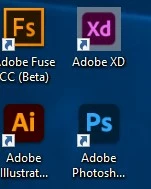
Adobe app logo is supper small

Love the new design improvements to the app logos, but the update made my destop xd logo supper small, any fixes. 


    This topic is closed to new replies. Start a new post to keep the conversation going.
    Harshika Verma
    Harshika VermaCorrect answer
    Community Manager
    Jun 26, 2020 2:12 PM UTC

    That is by default  Here is mine


    Yes that is by default for now. I have already a logged a bug for the issue and the team is working on it. You may definitely see improvements in the future releases of XD.


    Thanks,

    Harshika

    9 replies

    Harshika Verma
    Community Manager
    Community Manager
    Jun 16, 2020 10:38 PM UTC

    Hi there,


    We are sorry to hear that your XD logo is appearing very small. We would request you to please try uninstalling and reinstalling Adobe XD.


    Let us know if that helps.


    Thanks,

    Harshika

    Translate
    Participant
    Jun 16, 2020 10:55 PM UTC

    Hi, 
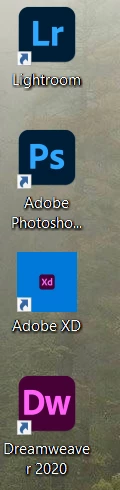
    yes that was the first thing i tried, at which point the second post i showed with the file icon appeared. 

    Translate
    Harshika Verma
    Community Manager
    Community Manager
    Jun 17, 2020 9:36 PM UTC

    Thanks for the confirmation. Would you mind sharing your system information and XD version with us so that we can escalate the issue to the team? I would like to know how you've created these shortcuts on your desktop. Have you installed these apps from Creative Cloud desktop app?


    We will try our best to help.


    Thanks,

    Harshika

    Translate
    Participant
    Jun 16, 2020 9:36 PM UTC

    its worse now, i sitll can open and use it normally 


    Translate