


Inspiring
November 25, 2020
Question

Adobe web fonts overriding local fonts in XD

  • November 25, 2020
  • 1 reply
  • 768 views

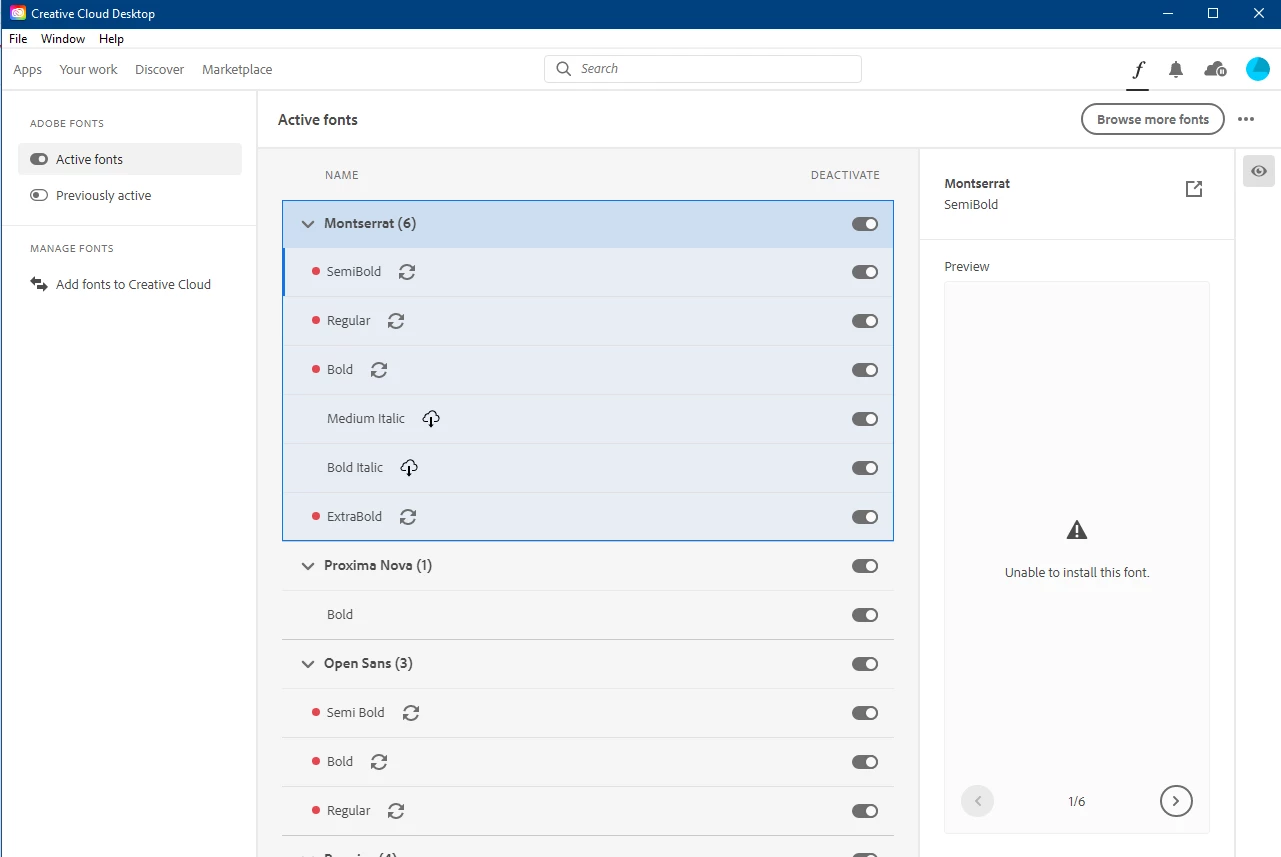
Why does Adobe claim my local fonts to the Adobe web fonts system when I use them in XD? There's no connection between them. I have downloaded all my fonts locally to my Windows font directory, some are TT and some are OT, and they are all installed on my OS. When I use any font in XD they suddenly appear in my CC desktop font setup with a cloud icon infront of some of the weights. It also say "unable to install this font". But I have every weight in the font family locally, so what's the deal? Why does the fonts appear there when I use them in XD? I've never done anything to activate any Adobe web fonts or anything remotly close to that. I just pick my locally installed font from the typetool in XD. I feel Adobe is messing with my font setup and that there's something wrong going on with the connection between Adobe web font and XD, cause it doesn't happen whenever I use them in PS, IN or Illu.
 

    This topic has been closed for replies.

    1 reply

    Harshika Verma
    Community Manager
    Community Manager
    December 1, 2020

    Hi there,


    We are sorry for the delay in response. Would you mind trying the steps mentioned in this article: https://helpx.adobe.com/fonts/user-guide.html/fonts/kb/troubleshoot-font-activation.ug.html?


    Let us know if that helps.


    Thanks,

    Harshika 

    perrybrusAuthor
    Inspiring
    December 1, 2020

    There's nothing there that suggests fixing my issue. Think Adobe needs to rewrite som code and fix how XD is corresponding with CC in terms of locally installed typefaces used in Xd.

    Adobe Employee
    December 2, 2020

    Hi,


    Thanks for bringing this to our attention. We will treat this as a bug. I have informed the XD and Adobe Fonts teams. Let us know if you need anything else.


    Cheers,
    Ben