
Participant
April 27, 2022
Question

Adobe XD - Can't delete a component in the source library

  • April 27, 2022
  • 2 replies
  • 205 views

Hello,

I'm having a problem when I try to delete a component in the source library.
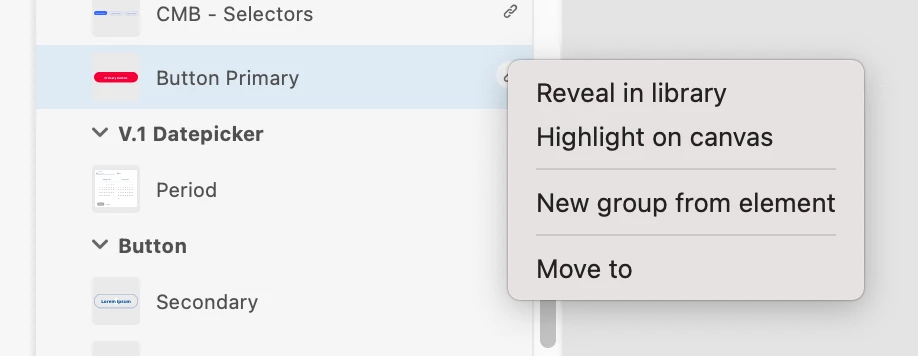
Being inside the source library file, when I right click on one of the components that I want to delete, the "delete" option does not appear as in other ones. The only options I have are 'reveal in library, 'highlight on canvas', 'new group from element' and 'movo to'.
I would like to know how do I delete it and why this is happening.


Thanks in advance!

    This topic has been closed for replies.

    2 replies

    HARSHIKA_VERMA
    Community Manager
    Community Manager
    April 27, 2022

    Hi juliayn,


    Sorry to hear you are unable to delete the component from the source library. From the screenshot, it appears that you're trying to delete a linked component. If yes, then please open the file from where this component is linked and then try deleting the component.


    Let us know if that helps.


    Thanks,

    Harshika

    juliaynAuthor
    Participant
    April 27, 2022

    Oh, and my version of  Adobe XD: version 50.0.12.14