paulc47271372
Participating Frequently
December 12, 2017
Answered

Adobe XD CC will not open

  • December 12, 2017
  • 2 replies
  • 21331 views

After very last update, Adobe XD CC will not open. I can't do my work!!!!!!!!!!!!!!!! Help!

This topic has been closed for replies.
Correct answer LR_McLister

Thanks Paul, Marwan,

We are working on a couple of solutions.  One of them is making XD 2.0 available in the Creative Cloud application.  I'll update this thread when there is more to share.

Thanks,

-Larry


HI All,

We have a fix in the works and hope to get it out by the end of the week.

In the mean time, we have made XD 2.0 available via the Creative Cloud application.  In order to access it:
  1. Open the Creative Cloud App
  2. Click the ellipsis to the right of your profile picture, then choose "Check For App Updates"
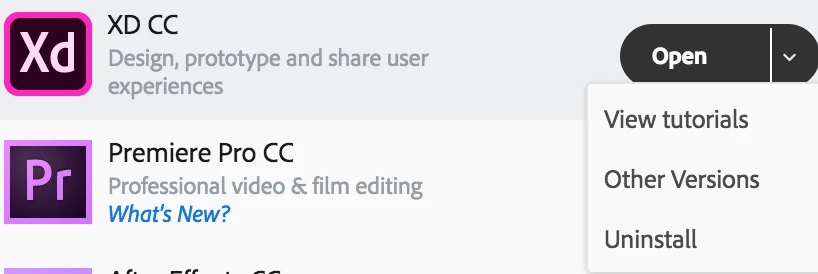
  3. In the Apps section of the Creative Cloud app, click the down arrow on the right, in the "Open" button to the right of  XC CC
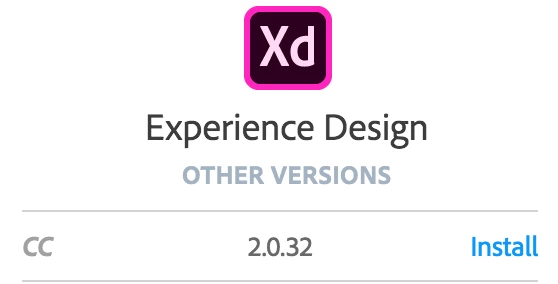
  4. Select "Other Versions"
  5. Then select Install
  6. Once the install completes, XD can be launched by clicking the XD icon in the Creative Cloud app, or by clicking the down arrow next to the "Update" button, and choosing "Open".  If "Update" is clicked, you will be updated to XD 3.0.

Hopefully this will serve as a better solution until the XD 3.0 hotfix is released later this week.

Thanks,

-Larry

2 replies

LR_McLister
Participating Frequently
December 15, 2017

Hi All,

There is now a hotfix available via the Creative Cloud application.  Simply exit XD, open the Creative Cloud application and click "Update" button to the right of the XD entry under "Apps"  It is version 3.1.12.2

Cheers,

-Larry

marwank
Participant
December 15, 2017

Hi Larry,

I'm not getting the new version that you mentioned when I update I got the one with the issue

Thanks,

Marwan

LR_McLister
Participating Frequently
December 15, 2017

Hi Marwan

Try refreshing the App list.

  1. Open the Creative Cloud app
  2. Click on the ellipsis to the right of your profile picture and choose Check for App updates
  3. Once it has refreshed, click back in the Apps pane and you should see the update button on the right side of the XD entry

-Larry

LR_McLister
Participating Frequently
December 12, 2017

Hi Paul -

Sorry that you are hitting this issue.  Does XD launch but then you just can't open files or does it not launch at all?

Could you please give us more information about your machine?  OS Version, hardware, etc?

Thanks,

-Larry

paulc47271372
Participating Frequently
December 13, 2017

Larry

Thanks for responding. I’m on a Macbook Pro, OS Sierra 10.12.6.

I think it may be the software Pulse Secure causing the issue. It’s a security software I must use to login to my network at work. Funny thing is, all my other Adobe products work fine, I tested them. It’s only XD that starts up fine, but once I select any project to open it crashes.

This has only started after the last XD update.

Paul

::

Paul Consiglio

<Personal info removed by the Moderator>

LR_McLister
Participating Frequently
December 13, 2017

Hi Paul -

If you turn wifi off on your machine, launch XD, and create a new document, are you able to reproduce the issue? 

Thanks,

-Larry