


Participant
May 31, 2018
Answered

Adobe XD CC won't open and crashes immediately

  • May 31, 2018
  • 2 replies
  • 3887 views

Hi,

I have been having some problems with Adobe XD since yesterday. After I click on the icon to open I get to see a blank white screen for about a second before it shuts down again. So far I have tried logging out of the Creative Cloud app and logging back in. I have tried reinstalling Adobe XD about 5 times, I restarted my computer a couple of times and just now I updated to the latest windows build. But nothing helped.

This is my version of Windows:
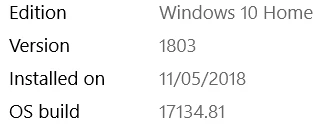
If I search for "Adobe XD" on my computer I find a lot of AppCrash logs, they are quite lengthy and I'm not sure if it's useful so I won't post them right away, but I can post them if needed.

I noticed that this is a pretty recent problem for a lot of Adobe XD users but it seemed to be caused by a certain version of Windows that I don't have. I hope there is anyone who could help me find a way to make it work again. Also I'm open for suggestions for other alternative software as I really need to get started on a prototype now for a project.

This topic has been closed for replies.
Correct answer Preran

Hi Pieterc,

Thank you for the information. Please send me your Adobe ID, location,phone number, and the URL of this post over a private message. To send a private message, click my picture and use the Message button. We will get in touch with you for investigation.

It would be wonderful if you could upload your log files to a shared location such as CC, Dropbox, or Google Drive and share it along with the email.

Thanks,

Preran

2 replies

MacMommy2020
Participant
April 2, 2021

Hello all!

I'm having issues with Adobe XD - after using the app for several years, suddenly it won't open.


I'm on Mac OS. When I try to launch the app I get the following error message:


Process:               Adobe XD [2912]
Path:                  /Applications/Adobe XD/Adobe XD.app/Contents/MacOS/Adobe XD
Identifier:            com.adobe.xd
Version:               38.1.12.2 (38.1.12.2)
Code Type:             X86-64 (Native)
Parent Process:        ??? [1]
Responsible:           Adobe XD [2912]
User ID:               501
 
Date/Time:             2021-04-02 16:10:27.834 -0400
OS Version:            macOS 11.2.3 (20D91)
Report Version:        12
Anonymous UUID:    
 
Sleep/Wake UUID:       
 
Time Awake Since Boot: 1400 seconds
Time Since Wake:       430 seconds
 
System Integrity Protection: enabled
 
Crashed Thread:        0
 
Exception Type:        EXC_CRASH (SIGABRT)
Exception Codes:       0x0000000000000000, 0x0000000000000000
Exception Note:        EXC_CORPSE_NOTIFY
 
Termination Reason:    DYLD, [0x5] Code Signature
 
Plus a lot of other information....
Can someone help me with this please?
 
 
Preran
PreranCorrect answer
Legend
May 31, 2018

Hi Pieterc,

Thank you for the information. Please send me your Adobe ID, location,phone number, and the URL of this post over a private message. To send a private message, click my picture and use the Message button. We will get in touch with you for investigation.

It would be wonderful if you could upload your log files to a shared location such as CC, Dropbox, or Google Drive and share it along with the email.

Thanks,

Preran

zerxx
Participant
June 6, 2018

Hi

I have the same here. Windows 10 1709. Yesterday XD worked fine. Today - window blinks and nothing else happens. No errors or messages.

Where can i find XD logs to check for errors?

Preran
Legend
June 7, 2018

Can you provide us with more information on the version of Windows that you are on? We are aware of crash issues with a Beta version of Windows. If you are not on that version, please send me the information as requested in my post above. We will do our best to help.

Thanks,

Preran