
Participant
August 18, 2021
Question

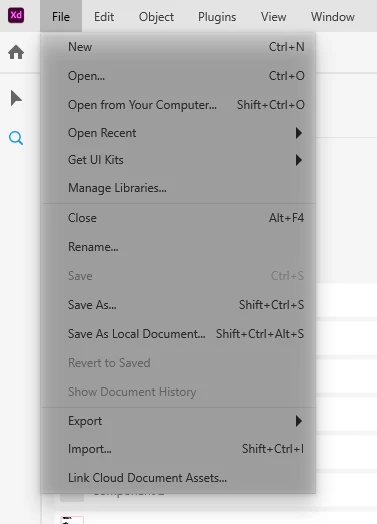
Adobe XD dropdown menus are greyed out and darker. Is there a way to remove this?
  • August 18, 2021
  • 1 reply
  • 550 views

Hello! Adobe XD dropdown menus are greyed out and darker. Is there a way to remove it? The shadow/darker menus are very annoying. Do you have the same or similar issue? I noticed it only after the latest update. I am on Windows.


Thank you for your help 🙂

This topic has been closed for replies.

1 reply

Rishabh_Tiwari
Community Manager
Community Manager
August 18, 2021

Hi there,


Sorry to hear about the trouble. This is not expected, so could you please try the steps shared below:


  1. Please check if there is any pending updates for Windows OS, if yes, please update OS to the latest version.
  2. Please update display drivers to the latest version as per the manufacturer's website.
  3. If nothing helps, please check if it's happening on a specific file or multiple files? If it's happening on multiple files, please uninstall XD using the Adobe Cleaner Tool https://helpx.adobe.com/creative-cloud/kb/cc-cleaner-tool-installation-problems.html and then re-install XD and let us know if this helps or if you need any further assistance.


Regards

Rishabh

Participant
August 18, 2021

Thank you, Rishab 🙂

I will try now 🙂