
Participant
July 5, 2022
Answered

Adobe XD mobile app scaling incorrectly

  • July 5, 2022
  • 1 reply
  • 281 views

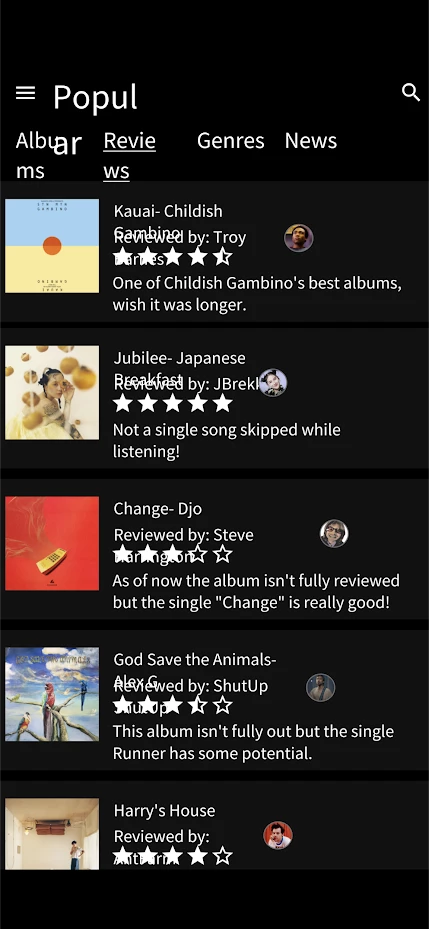
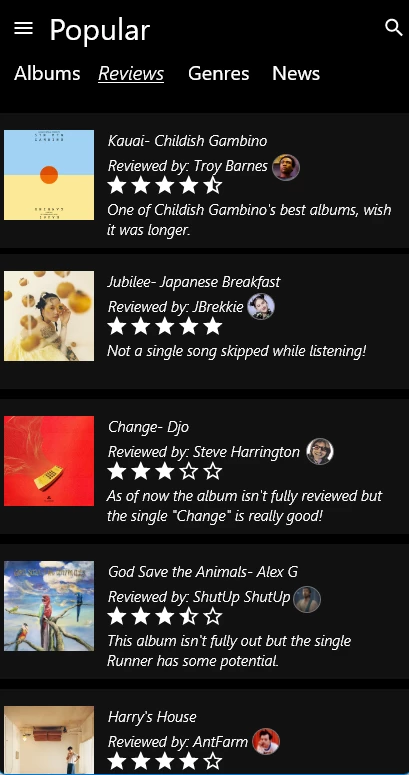
I'm designing my app to the dimensions of my current phone, Google Pixel 6 pro, and when I preview the prototype through the XD the mobile app, it scales everything weirdly. I'm currently using Desktop version 5.1.0.12 with mobile app version 50.0.0. I am also using the Pixel 6 pro artboards with "scale-to-fit" selected in the app. As you can see based on the screenshots, the first is how the prototype preview looks on my phone while the second screenshot is from the prototype preview available in the desktop app. 


1)
 

2)
  

    This topic has been closed for replies.
    Correct answer Spas K.

    The issue is with the font used. Try to use fonts available on Adobe Fonts to ensure they will properly sync, or view the web prototype through the phone instead of using the Xd app.


    When you use the app, fonts are limited to the available ones on the device or ones that can be synced through Adobe Fonts. Some font vendors don't allow fonts to be freely transferred to mobile devices, so if you're using a font that's just available on your PC and the app can't get it from anywhere, it will display a substitute with a different width, which sometimes breaks on new lines and gets misaligned like in your case.


    I believe there are ways to install fonts on Android manually, but I'll leave it to you to research that 🙂 When I've had to preview something on a phone, I just view the web prototype through a mobile browser.


    1 reply

    Spas K.
    Community Expert
    Spas K.Community ExpertCorrect answer
    Community Expert
    July 5, 2022

    The issue is with the font used. Try to use fonts available on Adobe Fonts to ensure they will properly sync, or view the web prototype through the phone instead of using the Xd app.


    When you use the app, fonts are limited to the available ones on the device or ones that can be synced through Adobe Fonts. Some font vendors don't allow fonts to be freely transferred to mobile devices, so if you're using a font that's just available on your PC and the app can't get it from anywhere, it will display a substitute with a different width, which sometimes breaks on new lines and gets misaligned like in your case.


    I believe there are ways to install fonts on Android manually, but I'll leave it to you to research that 🙂 When I've had to preview something on a phone, I just view the web prototype through a mobile browser.