

Participant
October 4, 2024
Question

Adobe XD not available

  • October 4, 2024
  • 1 reply
  • 784 views

Hi,

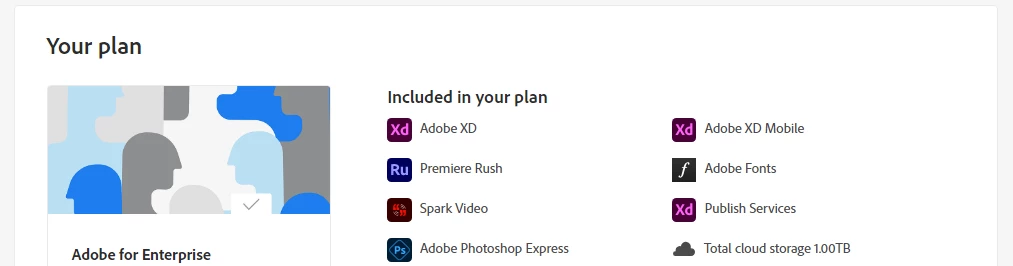
Adobe XD is not available even if it says in plan that the App is included. Can somebody support me?

 

    This topic has been closed for replies.

    1 reply

    creative explorer
    Community Expert
    Community Expert
    October 5, 2024

    @andrei_8973 it's there..... go to Adobe.com
    1. Here is my Adobe to Enterprise:


    2. Click on the 'View all apps and services' in the 'orange selection'
    3. Another 'pop-up box' will open. Click on the button 'Access your apps and services' 'orange selection' or enter, https://www.adobe.com/apps/all/all-platforms

    4. Scroll all the way to the bottom to see Xd


    NOTE: If you recently installed the Install Creative Cloud, Xd will not show up for about 24 hours. It is a slight delay, but no idea why, but, trust me, within 24 hours it will show up. In your case, Xd is part of your screenshot, so likely, it's already for download


    m
    Participant
    October 7, 2024

    @creative explorer I have Creative Cloud Desktop installed for a week now and it's still not there. I found a download link for Adobe XD and when I try to access the URL, it throws Page Not Found, but for a colleague which is an older user it works.

    I read on Adobe Community that XD is not available for new users (that's my case) only if the account has the All Apps subscription.


    creative explorer
    Community Expert
    Community Expert
    October 7, 2024

    That's not correct @andrei_8973! My students have installed Adobe for Enterprise just as shown above. And it did take my students only 24 hours to show up and install it. Their CC Subscription is all the apps and yes, they are new users like you. Installed on both PC and MAC, older PCs & Macs to newer Macs/PC too. 

    *NOTE: that link in your screenshot does work:

    https://www.adobe.com/apps/all/desktop/pdp/xd


    *Note: 
    Because you mentioned 'colleague which is an older user it works', the only thing I can think of is you are ONLY ALLOWED to have Adobe's software on two devices associated with your account. This often means one device for your desktop and one for your laptop. Sharing your Adobe activation with a colleague is generally not allowed and violates Adobe's licensing terms.

    OR

    Double check with your IT Department? 
    https://helpx.adobe.com/enterprise/using/enable-disable-services.html


    OR

    Creative Cloud for Enterprise Support
    https://helpx.adobe.com/contact/enterprise-support.html


    m