Participant
July 1, 2022
Answered

Adobe XD - Problema na hora de abrir

  • July 1, 2022
  • 2 replies
  • 437 views

Boa tarde! Então, quando vou abrir o Adobe XD, ele não abre, ele fica na tela que mostra abaixo e não sai dela. Já tentei desinstalar o aplicativo, porém não foi.
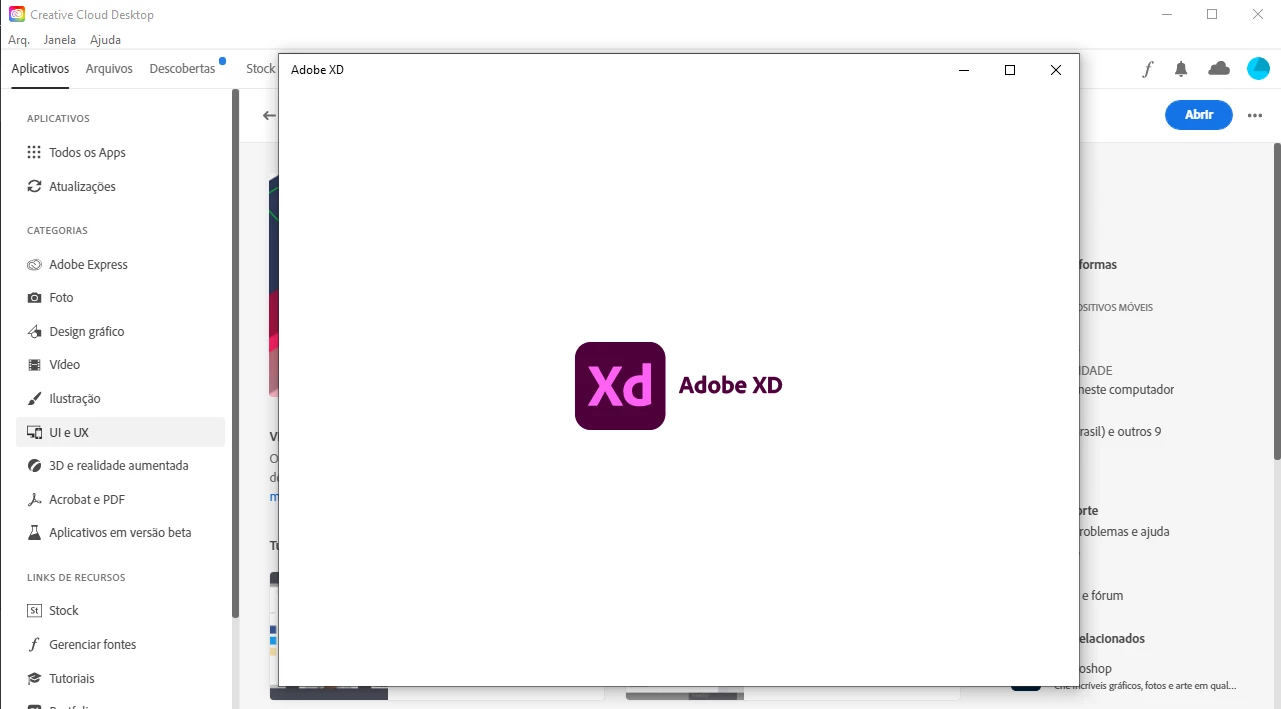

    This topic has been closed for replies.
    Correct answer HARSHIKA_VERMA

    Hi @Lucaix,


    We are sorry to hear you're unable to launch XD and getting stuck on the logo screen. Have you tried the steps suggested by our expert? If you're still experiencing the issue, then could you please 

    generate logs and crash dumps and upload them to a shared location such as CC or Dropbox and share the URL with me over a private message so that I can create a new bug for further investigation?


    Please also share the version of XD and the OS details.


    Steps to try:

    • Go to Creative cloud desktop> Check for file syncing> Wait for it to sync completely. 
    • Wait for a min, then try to open documents from XD
    • Quit XD, CCD, and Coresync from the Task manager


    If this doesn't help, please try Re-installing XD.


    Let us know if that helps.


    Thanks,

    Harshika

    2 replies

    HARSHIKA_VERMA
    Community Manager
    HARSHIKA_VERMACommunity ManagerCorrect answer
    Community Manager
    July 7, 2022

    Hi @Lucaix,


    We are sorry to hear you're unable to launch XD and getting stuck on the logo screen. Have you tried the steps suggested by our expert? If you're still experiencing the issue, then could you please 

    generate logs and crash dumps and upload them to a shared location such as CC or Dropbox and share the URL with me over a private message so that I can create a new bug for further investigation?


    Please also share the version of XD and the OS details.


    Steps to try:

    • Go to Creative cloud desktop> Check for file syncing> Wait for it to sync completely. 
    • Wait for a min, then try to open documents from XD
    • Quit XD, CCD, and Coresync from the Task manager


    If this doesn't help, please try Re-installing XD.


    Let us know if that helps.


    Thanks,

    Harshika

    HARSHIKA_VERMA
    Community Manager
    Community Manager
    July 11, 2022

    Hi @Lucaix,


    We would like to follow up on your issue. Are you able to resolve the issue? If no, please share the requested logs so that we can continue to investigate the logs. 


    Please feel free to update the discussion if you need further assistance from us.


    We would be happy to help.


    Thanks,

    Harshika

    Ares Hovhannesyan
    Community Expert
    Community Expert
    July 2, 2022

    Try to Use the Creative Cloud Cleaner Tool to solve installation issues
    https://helpx.adobe.com/creative-cloud/kb/cc-cleaner-tool-installation-problems.html

    Then sign out and sign in back into your CC account.