Participant
May 20, 2020
Answered

Adobe XD saving options are changed after XD 29.

  • May 20, 2020
  • 25 replies
  • 26747 views

I did the last update of Adobe XD, version: 29.0.32.13

So these last update it changed the way you save your file, for some reason it saved it in the cloud, which I don't want to, since I want to save the file in a specific folder, because is for work, so first I had to try to find where the file was saved, when I found out a lot of unused files where there, and when I finally manage to save it where I wanted, the file was corrupted, so when opening gave me an error, so manage to retrive the last open file and finally to save it where I wanted it. The thing is I am working and I don't have time for this unacessary changes, you are supposed to be an UX tool which should be user friendly, making this changes are a bit reduntant and cause disruption while working. I never commented in any Adobe software, but this is my second feedback. Please think before making big changes on the way that the software is used. Appreciated. 


<The Title was renamed by moderator>

Correct answer HARSHIKA_VERMA

Hi Claudia,


I understand your concern and thanks for sharing your feedback. The team is working on it and you will definitely see the improvements in the UI in future releases of XD. I will make sure to share your feedback with the team.


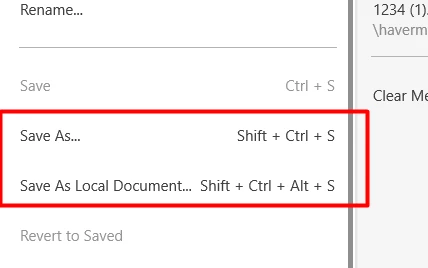
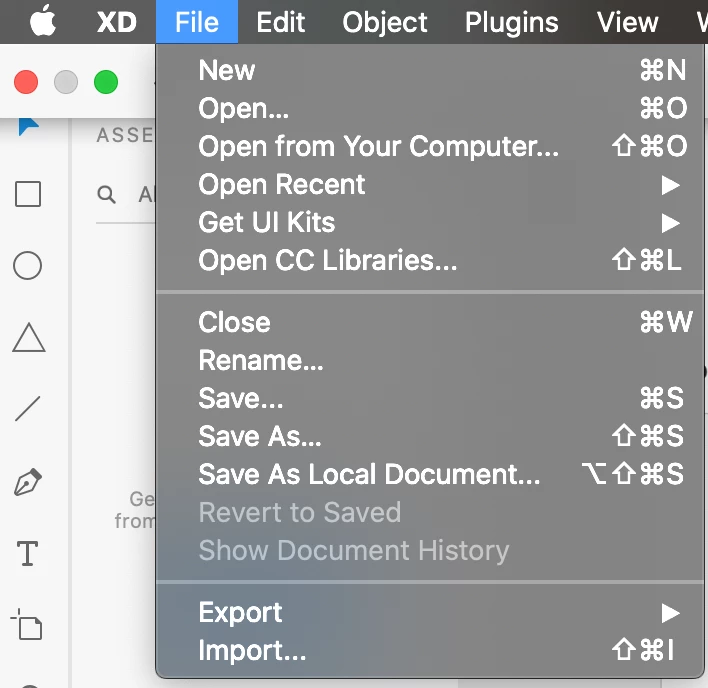
For now, in order to save the file as a local document, the options are available here for windows and mac operating system.


  • When you Save as a local document it will open the diaglog box where you can select the folder in which you want to save the file.
  • Save As will simply works as saving to the cloud document.


You may also submit your feedback here: https://adobexd.uservoice.com/forums/353007-adobe-xd-feature-requests/suggestions/40600444-open-local-documents-from-welcome-screen and upvote the request to add your voice.


Let me know if that helps.


Thanks,

Harshika

25 replies

Participating Frequently
June 2, 2020

Why is the 'save as' saving by default to the cloud?
First, If I'm working from a desktop file, it shouldn't change the way I want to work.
Second, if it changes, it should give me the opportunity to choose and change it.


Besides all of this, my company doesn't want us to have stuff in the cloud. This is making me close the doc. go to finder, copy the doc and change its name. _nightmare_


This only happened since the last update and it's annoying me.


{Renamed By MOD}


Rishabh_Tiwari
Community Manager
Community Manager
June 2, 2020

Hi Ana,


Thanks for reaching out. After the recent update, a new shortcut has been mapped for saving the file locally for the first time and that is   ⌥⇧⌘S for macOS and   Shift + Ctrl + Alt + S for Windows Operating System. So if you are saving the file for the first time, you can save using the shortcut mentioned above. In order to save the changes you can for sure use CTRL+ S and CMND +S and it will not change the location of the saved file.


Let us know if this helps or if you need any further assistance.


Regards

Rishabh

Participating Frequently
June 2, 2020

Thank you for clarifying.
It helps. 

mrichterstl
Participant
May 30, 2020

Claudia, I am with you. I can't believe that a tool for user experience designers keeps taking steps backwards in terms of usability. Sort of ironic! I also NEVER comment like this on any type of software, so this is a pretty big deal for me to be commenting on this issue. Of course, it's not just this relatively small issue; there have been others, including a bungled rollout of a prod release (which was subsequently recalled, then rolled out again) several months ago. I've never been a huge fan of XD, but it was the tool chosen by management at my place of employment where I have been for the past year. Guess what, though? That management is now gone, unfortunately due to the pandemic. While we miss them, personally and professionally, those of us who remain now have the option to change our tools of choice, and have already identified XD as something that we no longer wish to use. It's just a matter of which tool we choose to replace it with.

Participant
May 29, 2020

Updating to the latest XD and I'm now unable to do something as simple as 'Save As' to a location of my choice. I'm getting a single line save box with the 'Document name' and no dropdown or anything to save to a place.


After doing a search for the file name on my laptop, the XD file is saving within the 'Library > App Support > Adobe > Adobe XD > CloudToLocalMRUCache > 'Alot of letter and numbers here'.


Copying my XD file from this folder to use gives 'ERROR CODE: 87'.


How can something so important not be tested?? Is anyone else having this issue?

Community Expert
May 29, 2020

Try: Cmd + Alt + Shift + S

mrichterstl
Participant
May 29, 2020

Because THAT is super intuitive! Lol


Is this working as designed, or is it a bug?

atran-1digital
Known Participant
May 22, 2020

.

when saving a new file, there is no longer an option to choose location.


even when committing to saving a file, there is no native (mac) user interface to allow selecting a location.


what is going on here? this simple function bug got passed abode's q/a team somehow?


this is the 2nd major item adobe's messed up for me with this new update.... so p!ssed off when presentation schedules and client relationship is messed up by this bs.


i can't even find where the file is now lol -- get on the ball adode!

Community Expert
May 22, 2020

Cmd + Alt + Shift + S (Mac) to save locally

atran-1digital
Known Participant
May 22, 2020

.

thx @kenneth.


these little default actions decisions on abobe's part are really annoying and egregious... like this one: forcing user to save to adobe's cloud server. just simply confusing and lame.


let user decide g0ddammit

HARSHIKA_VERMA
Community Manager
HARSHIKA_VERMACommunity ManagerCorrect answer
Community Manager
May 20, 2020

Hi Claudia,


I understand your concern and thanks for sharing your feedback. The team is working on it and you will definitely see the improvements in the UI in future releases of XD. I will make sure to share your feedback with the team.


For now, in order to save the file as a local document, the options are available here for windows and mac operating system.


  • When you Save as a local document it will open the diaglog box where you can select the folder in which you want to save the file.
  • Save As will simply works as saving to the cloud document.


You may also submit your feedback here: https://adobexd.uservoice.com/forums/353007-adobe-xd-feature-requests/suggestions/40600444-open-local-documents-from-welcome-screen and upvote the request to add your voice.


Let me know if that helps.


Thanks,

Harshika

Participant
July 7, 2022

Saving to the cloud should be the exception, not the default. User's mental model has been to hit ctrl+shift+S to Save As to a local document. for virtually every sofware product. It feels like a manipulative marketing ploy to change that hotkey to use your cloud service. What a joke. And the Irrony of violating a decades old, universal mental model like "Save As" in a UX prototyping software - is just hilarious - something an obilivious UX newb would do (actually, it feels intentiounally devious). Egg on your face Adobe. Way to be an industry leader here.

My industry is in critical infrastructure. Our products and software are #1 targets for cyber attacks. Both you and I do not want our prototyped software product concepts leaking out of our R&D and getting into terrorist's hands. The security of the world's electrical infrastructure depends on it.

anything cloud based is strictly prohibited. So it is a huge security risk when an innocent software engineer or UX designer follows the age old huristic of hitting Ctrl+Shift+S to save an XD proof of concept prototype, thinking they are saving it to their desktop like every other software in existance - and then accidentially places it on the cloud.

Slow clap for you guys. keep up the good work.


HARSHIKA_VERMA
Community Manager
Community Manager
July 7, 2022

Hi @bryafout,


We understand your concern, and definitely, you've got the point. I will make sure to share your feedback with the team to make improvements in the future. I would encourage you to please submit your feedback and upvote the request here, which will give it more visibility.


Thanks,

Harshika