

Adobe XD scenegraph.root reading layers backwards??
Hello, im a bit confused... in some of my other panel scripts, whenever iterate through the "scenegraph.root" and console.log all the nodes (and children nodes).. the scenegraph would read or spit out the information from the layers panel from TOP to BOTTOM. However, after creating a new panel using the UXP Developers Tool it seems to be reading from BOTTOM to TOP...
for example, please look at the screenshot below. You can see insidie my "Main Artboard" there are 3 items...
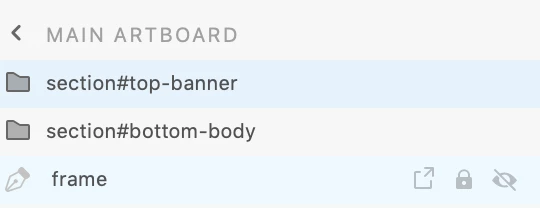
whenever i output using the below code, the UXP console debug tool outputs the information starting from the bottom. It will output 'frame', then 'section#bottom-body' and then 'section#top-banner'... if i remember correctly from my previous scripts, its suppose to read it from the top then the bottom. This is causing me issues.. how would i reverse it so that i output whats on top first and then going down. or is my code wrong?
const scenegraph = require("scenegraph");

recurseSceneGraph(scenegraph.root);

function recurseSceneGraph(node) {
    node.children.forEach((nodeParent) => {
        console.log("--" + nodeParent.name);
        if (nodeParent.children.length > 0) {
            nodeParent.children.forEach((node) => {
                if (node.children.length > 0) {
                    console.log("-" + node.name);
                    recurseSceneGraph(node);
                }
            });
        }
    });


 AdChoices