



Anchor Links ( If you've tried everything else)
Okay, I'm new to XD, but thought I should share after the frustration and lack of help I found online on why my anchor links would not work! The link was added to the hover state of my button. My button was set to deefault in preview. Linked to the appropriate component on the same artboard like I wished, but no matter what I did nothing would happen!
After creating new files to see what it could be, I finally figured out that when my artboard was taller than standard websize the button would not anchor down the page. I didn't realize I could change how the preview window displayed. It would not jump simply becasue the entire page was being viewed at once.
I looked in the Artboard settings of my project and changed the Viewport to 800 rather than having it set to see the entire page. Also, make sure Scrolling it se tot Vetical and not None.
Hope this helps someone!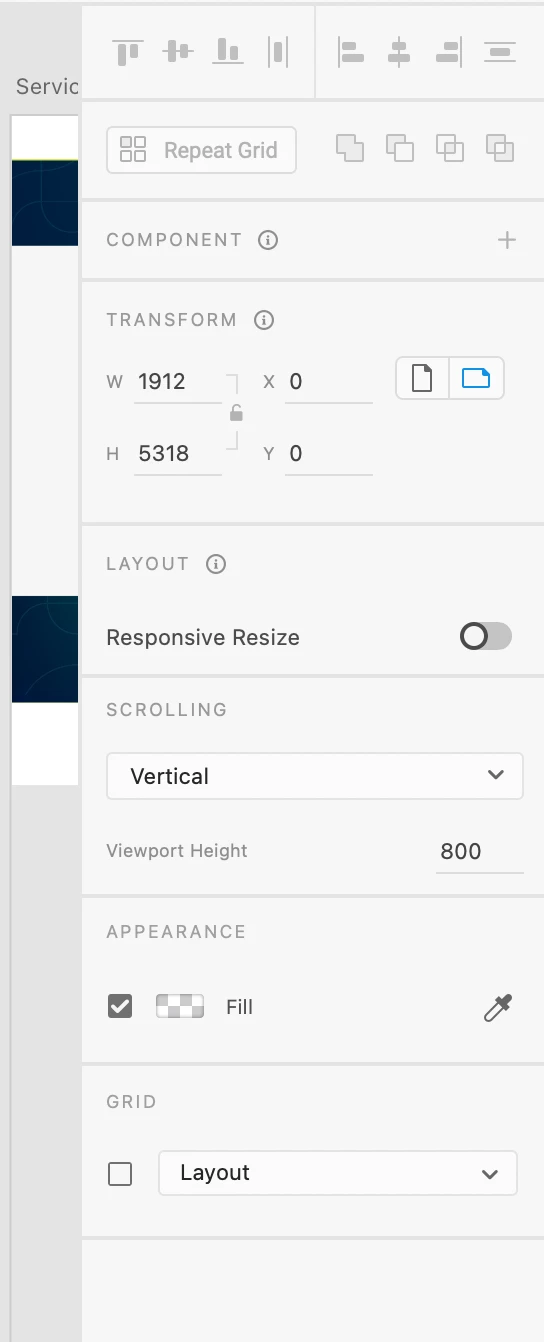
 AdChoices