
Participant
November 22, 2021
Answered

Apple ui kit icon problem

  • November 22, 2021
  • 1 reply
  • 554 views

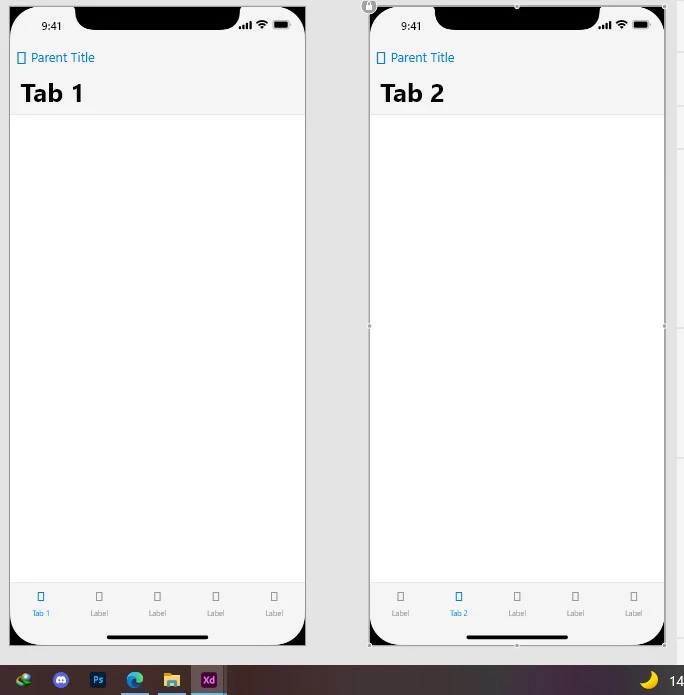
Hello first sorry if this is the wrong place to ask because im totally newbie in this field, so my problem is whenver i open the apple ui kit (ios 15) i found these icons missing like the back button and the icons in the indicator in the bottom i tried download it multiple times but the same problem so does anyone faced this problem and what is the solution and thanks!!
    This topic has been closed for replies.
    Correct answer HARSHIKA_VERMA

    Hi there,


    Thank you for reaching out. I assume this is because of the fonts not installed in your machine which are used in the file. Please make sure you've installed the fonts in your machine and then try again.


    Let us know if that helps.


    Thanks,

    Harshika

    1 reply

    HARSHIKA_VERMA
    Community Manager
    HARSHIKA_VERMACommunity ManagerCorrect answer
    Community Manager
    November 22, 2021

    Hi there,


    Thank you for reaching out. I assume this is because of the fonts not installed in your machine which are used in the file. Please make sure you've installed the fonts in your machine and then try again.


    Let us know if that helps.


    Thanks,

    Harshika

    Chris W. Griffith
    Community Expert
    Community Expert
    November 22, 2021

    That UI kit relys on the SF Symbol Font to be installed. It should be inclued with the kit's download from Apple. If not, it is available directly from Apple.