miac96810032
Participating Frequently
October 25, 2018
Answered

Artboard Prototype

  • October 25, 2018
  • 2 replies
  • 1121 views

Hi,
Could you please fix the problem of showing multiple artboards in Prototype Link.
I have linked all artboards - but it will only show the same three artboards. I have no idea why.

I have seached for the answers in the other discussions. But can't seem to find a solution.

Thank you.

This topic has been closed for replies.
Correct answer VivekP

Would it be possible to share your file for testing. You can upload it to a shared location such as Creative Cloud, Dropbox, or Google Drive and share the URL over a private message. To send a private message, click or hover over my profile and select Message.

Let us know if you need more info.

Thanks,

Preran


Hi miac11318964,

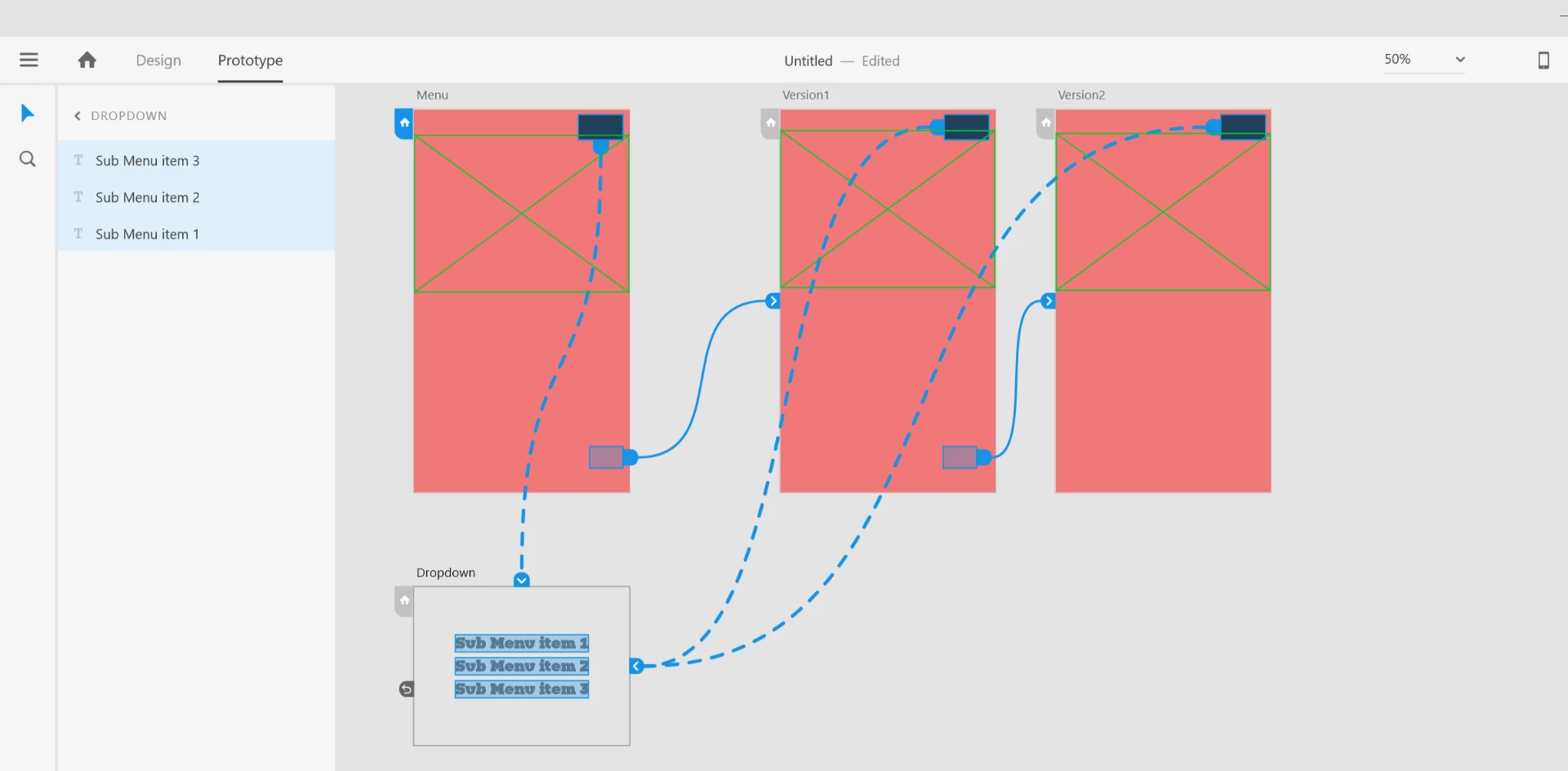
Looks like you are trying to create various versions of a dropdown menu in XD and your set up is something like the one I have created in the screenshot below:

If this is the case as yours the XD will only export Menu and Dropdown artboards only. Please refer to the notes mentioned below in Publish your prototype and/or design spec and share it with stakeholders by providing a public or private web link. that explains this behavior.

  • If you publish your design without interactions, all your artboards are uploaded and users can navigate using the keyboard arrow keys. The order of your artboards is left to right, top to bottom.
  • If your design includes interactions, only those artboards connected to the Home artboard are uploaded and shared.

As a workaround, you can create invisible items on the home page and link it with "Version 1" artboard and create an invisible item in "Version 1" and link it with version 2. This will ensure all the artboards are exported.
I also understand that you would like to have an option that lets you export all artboards in prototype, hence I would advise you to visit the UserVoice link below and vote and comment for this feature.

Option to publish all screens even without prototyping – Adobe XD Feedback : Feature Requests & Bugs

Regards,

Vivek

2 replies

Dan Rodney
Community Expert
Community Expert
October 28, 2018

That is certainly not normal behavior. Have you tried making a change and updating the prototype (or creating a new link)? Maybe something went wrong the first time it got uploaded.

— Adobe Certified Expert & Instructor at Noble Desktop | Web Developer, Designer, InDesign Scriptor
miac96810032
Participating Frequently
October 29, 2018

Yes I have tried to make a new link, update the link and tried to move it to a new project.

Preran
Legend
November 1, 2018

Would it be possible to share your file for testing. You can upload it to a shared location such as Creative Cloud, Dropbox, or Google Drive and share the URL over a private message. To send a private message, click or hover over my profile and select Message.

Let us know if you need more info.

Thanks,

Preran

Atul_Saini
Legend
October 25, 2018

Hi Miac, thanks for using Adobe XD, I would like to know if you if the artboards are linked to the home artboard.

miac96810032
Participating Frequently
October 26, 2018

Yes I would say that they all are connected to the Home artboard.

Example:

Home artboard is called Menu

Artboard called Drop Down is connected to Menu.

Artboard called Version 1 is connected to Menu
Artboard called Version 2 is connected to Menu

But only two artboards are showing in Prototype:
Menu and Drop Down.

Atul_Saini
Legend
October 27, 2018

Hi Miac,

Thanks for sharing the details, I would request you to share the sample file with us so that we can investigate it appropriately.

You may upload the file on CC or Dropbox and send the link using a private message.

Thanks,

Atul_Saini