
Participant
April 6, 2017
Answered

Asking for license after latest update windows 10

  • April 6, 2017
  • 1 reply
  • 2177 views

After updated to latest XD it's asking for a license already have to adobe creative cloud license activated too
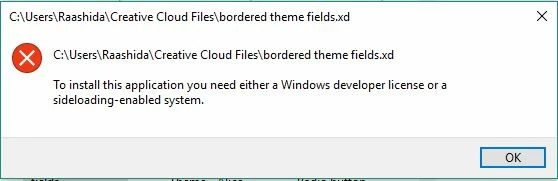
"To Install this application you need either a windows developer licence or a sideloading-enabled system"

This topic has been closed for replies.
Correct answer Raashid_99x

Its works after I update tIe developer settings to sideload apps.

Settings, Search "Developer settings" and choose "Sideload apps" it will work.

Windows 10

Version 1607

1 reply

Participant
April 6, 2017

Hi there,

First, thanks for posting here. Would you mind sharing the Windows version you are running? To figure that out, you should press the windows key, then type "winver" and hit enter. And a few more questions, just to see how we can look deeper into your issue:

  • Is it correct that you recently updated both Windows and XD? If so, did you first update XD and then Windows or vice-versa?
  • If you go to Settings, search "developer settings" and choose "Sideload apps", is XD starting for you?
  • Does uninstall XD/reinstall help in any way? I know this is a bit extreme...

Thank you!

Raashid_99xAuthorCorrect answer
Participant
April 7, 2017

Its works after I update tIe developer settings to sideload apps.

Settings, Search "Developer settings" and choose "Sideload apps" it will work.

Windows 10

Version 1607

Participant
April 7, 2017

Glad to see XD is working for you know. Still, in order to prevent this inconvenience happening to other users, it would be helpful to know a few more details. First, the OS build number (right after "Version 1607" in the text winver provides). Also, the exact sequence that lead to the problem will certainly be helpful: did you first update XD and then Windows or vice-versa?

Thank you for helping out!