
AmmarSM
Known Participant
January 6, 2017
Answered

Assets resizing to iPhone 7 Plus

  • January 6, 2017
  • 1 reply
  • 921 views

Hi

In latest update you introduced assets which is very nice, one of them is the UI bar the bar at top of iPhone that shows carrier info and battery charge etc, thing is its for iPhone 7 so when I drop it on iPhone 7 Plus art board, its very small and far from left and right edges and don't know how to scale it and in which proportion ?

How can you help in this task ?
    This topic has been closed for replies.
    Correct answer Chris Bank - Express Dev

    Here are the steps I would use:

    1. Copy the status bar from the UI hit
    2. Paste into new iPhone 7 artboard
    3. center the status bar
    4. open the layers panel
    5. select all the right hand art (bluetooth, battery percent, battery)
    6. use shift+right arrow to nudge them 20px to the right
    7. select all the left hand art (signal strength, carrier, wifi)
    8. use shift+left arrow to nudge them 20px to the left

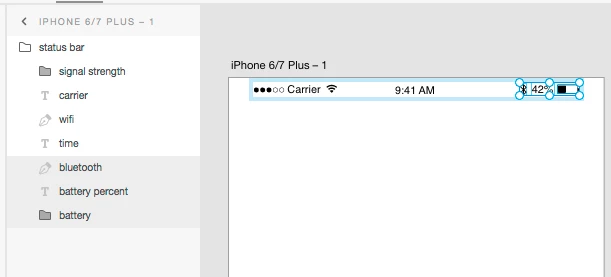
    Here's what my app looks like at at 5 (right hand art selected, just about to nudge)

    Hope that helps and thanks for using XD.


    Chris

    1 reply

    Chris Bank - Express Dev
    Adobe Employee
    Adobe Employee
    January 7, 2017

    Here are the steps I would use:

    1. Copy the status bar from the UI hit
    2. Paste into new iPhone 7 artboard
    3. center the status bar
    4. open the layers panel
    5. select all the right hand art (bluetooth, battery percent, battery)
    6. use shift+right arrow to nudge them 20px to the right
    7. select all the left hand art (signal strength, carrier, wifi)
    8. use shift+left arrow to nudge them 20px to the left

    Here's what my app looks like at at 5 (right hand art selected, just about to nudge)

    Hope that helps and thanks for using XD.


    Chris

    AmmarSM
    AmmarSMAuthor
    Known Participant
    January 8, 2017

    Thanks allot, but is there a role for this 20 pt moving ? or some one just figured it out ? I didn't see any helping info in iOS design

    sheets which is strange ? another question so how we will do in iPad Mini, iPad 9.7" and iPad 12.9" ?

    Thanks allot for your replay.

    Kindest Regards

     Visionary & Dreamer